Built for Bulkhead’s three-team, 100-player warfare: the Elocarry Wardogs cheat pairs a humanised aimbot with ballistic prediction and a mortar solution with player, vehicle, FOB and loot ESP that read the whole control zone, so you hold the zone, keep your loadout alive and bank the cash. Undetected on Elytra, activated the moment you pay.
Undetected Instant activation Out of stock Secure Stripe checkout
Cancel anytime
★★★★★ Rated 4.7/5 from 259 reviews on Trustpilot
Undetected on Elytra ★ 4.7
Undetected on Elytra Supported on Steam
Quick answer
The Elocarry Wardogs cheat is undetected on Elytra, with a humanised aimbot, mortar prediction and player, vehicle, FOB and loot ESP, and you get instant access the moment you pay from £9.99. Builds are polymorphic and updated on patch day, with public live status and 24/7 support from Barry and the team. Cancel anytime.
Why players pick the Wardogs cheat
The things that actually matter: staying undetected, keeping your frames, and full control.
Undetected by design
Polymorphic builds that change signature on every launch and update the moment Elytra patches.
No FPS drops
A light build with fully customisable visuals, so your frames stay high and the overlay stays clean.
Always updated
Updates apply in the background through the launcher. You never hunt for a working build.
Wardogs
The Wardogs cheat in depth
A closer look at how the Wardogs cheat plays, what sits inside the build and how we keep it undetected.
01
Every option in one licence
One Wardogs licence is the whole menu: 103 options across nine groups. The aimbot and its humanisation layer, the triggerbot, the weapon tab, mortar prediction for the L81, player ESP, the ESP text fields, vehicle ESP, FOB ESP and backpack and loot ESP all ship to every buyer, and every option is explained further down this page. Plans run one day, one month or three months, every plan carries the full build, and anything we add as Wardogs moves through Early Access lands in the same build without a second purchase.
02
Three teams, one control zone
Wardogs is not a battle royale. Up to 100 players split across three factions, Lonestar, Valkyra and Manticore, and fight over a single control zone inside a much larger map. Every 30 seconds the team with the most players inside scores a point, and the first to 100 wins. So every push into the zone is contested from two directions at once. Player ESP is set up for that shape: team colours per element keep the two enemy factions apart from each other and from your own side, separate enemy and teammate profiles let you draw friendlies lighter, and the faction name field tells you which side a squad belongs to before you commit.
03
An aimbot with a human hand
Wardogs fights run from a doorway at ten metres to a ridge line hundreds of metres away, so the aimbot is built for range. Ballistic prediction leads the shot on a soldier crossing open ground, the aim bone picks head, neck, chest, pelvis or whatever is closest, and dynamic FOV keeps the lock the same size on screen when you go down a scope. The humanisation layer is the deepest part of the build: aim speed, target width, a minimum and maximum reaction delay, overshoot frequency, a second correction rate, hand steadiness, tremor strength and path curvature. Together they make each correction look like a good player rather than a perfect one. A deadzone and an engagement threshold decide when it steps in.
04
Recoil, sway and spread
The weapon tab is three switches and two sliders. No recoil takes the kick out of a rifle or a heavy weapon, and the Recoil X and Recoil Y sliders set how much is removed on each axis, from 0 to 100, so you can leave a little climb in and keep a spray that still looks earned. No sway holds a scope still while you wait for a soldier to leave cover, and no spread puts each round where the sight is pointing. In a game where every death costs you the loadout you paid for, winning the first exchange matters more than usual.
05
Mortar prediction for the L81
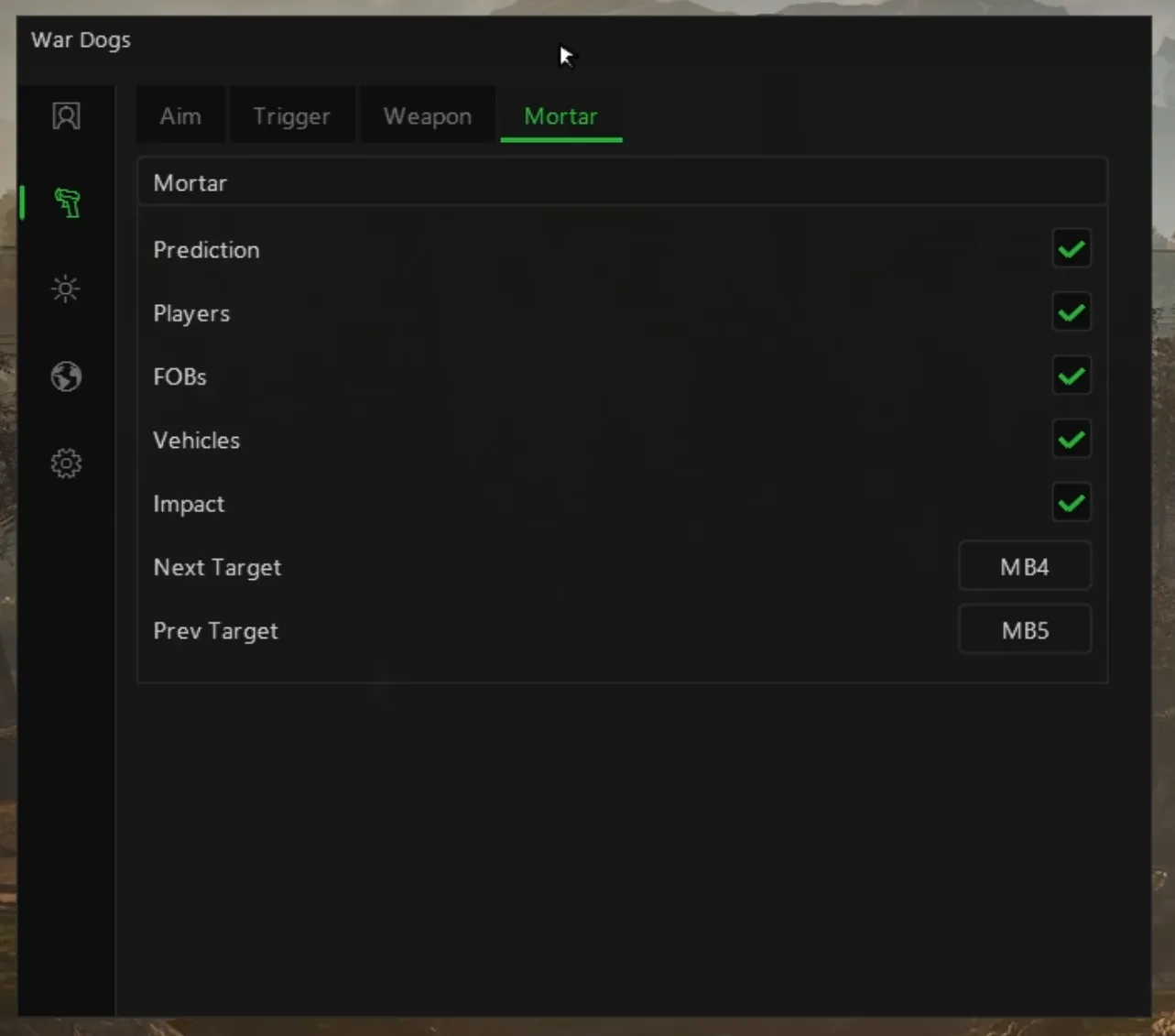
A mortar is how a Wardogs team breaks a dug-in position, and the L81 is hard to use well by eye. Sit in one with mortar prediction on and a HUD shows the range and yaw you need to hit the selected target, the range and yaw the tube is set to now, and the difference between them. Turn until both close and a HIT indicator tells you that you are lined up. Targets can be players, FOBs or vehicles, the next and previous keys cycle through them, and sticky target holds your pick while you fire. A world impact marker shows where the rounds come down and a map marker shows the target you selected.
06
Vehicles, helicopters and FOBs
The map is big, and the threat is rarely only the soldier in front of you. Vehicle ESP sorts every vehicle into wheeled, tracked, rotary, airplane and stationary classes, labels each with its in-game HUD name and distance, and builds a colour list as new vehicles come into view, so a Humvee on the road, a tank on the ridge and a Little Bird or a HAVOC over the trees each read differently. FOB ESP marks every forward operating base out to 2000 metres in its faction's colour, with its state, active, disabled or destroyed, so you know where each side is building and storing supplies before you walk into it.
07
Backpacks, loot and your cash
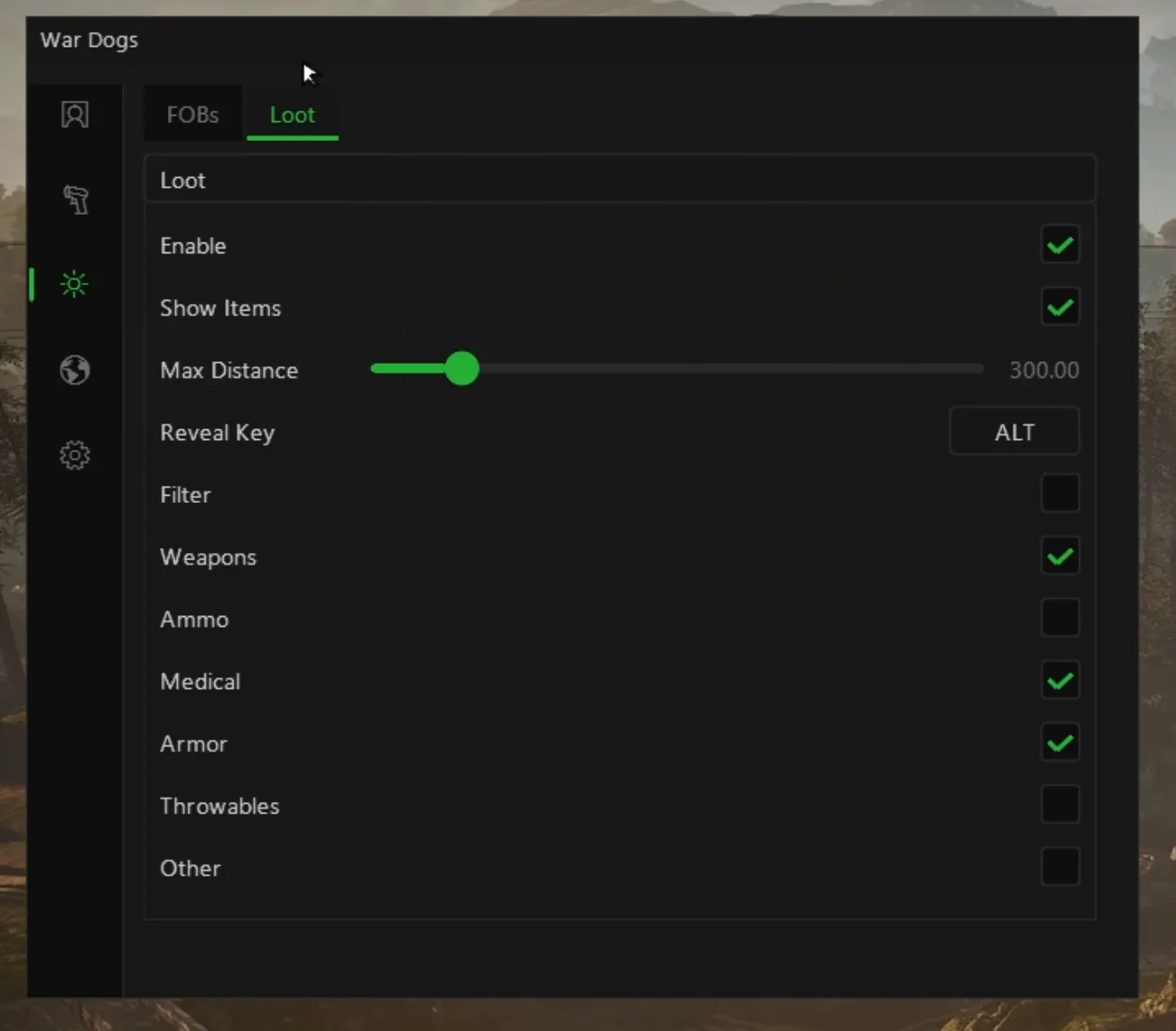
Every player starts with ten thousand dollars of in-game cash, buys a loadout each life and earns more from teamplay such as reviving, transporting friendlies and holding the zone, and the balance carries from match to match. A death costs real progress, and the bags left after a push are the cheapest kit on the map. Backpack ESP marks death backpacks and downed corpses, the compact view shows where each came from, its best item and its distance, and the reveal key lists up to twelve items inside. The loot filter sets any item to default, wanted or hidden, with categories, a search box and a live list that fills as you walk bags.
08
Elytra, Steam and Early Access
Wardogs runs Elytra as its anti-cheat on PC, and the Elocarry build runs against it on the Steam version, on Windows. There is no DMA card to buy and no second PC. Wardogs has been in Steam Early Access since 10 September 2026 and Bulkhead expects to stay there for one to two years, so the game and its anti-cheat will keep changing. Builds are polymorphic, changing signature on every launch, and the build is rebuilt the moment Wardogs or Elytra patches. Live status is public around the clock, and we pause sales the moment anything looks off. No method is ever guaranteed, and we will always say so.
09
Wardogs hacks, wallhacks and what the words mean
People search for Wardogs cheats, Wardogs hacks, a Wardogs aimbot, Wardogs ESP or a wallhack, and they all point at parts of this one build. The wallhack is the ESP: soldiers, vehicles, FOBs and backpacks drawn through walls and terrain with the details you choose. The aimbot is the humanised targeting above, and no recoil, no sway and no spread live on the weapon tab. A mortar calculator is what mortar prediction replaces, with the range and yaw worked out live while you sit in the L81. There is no money hack, because your cash is kept on Bulkhead's servers. Every real feature is a toggle in the same menu, not a separate download.
10
Which options carry risk, and which do not
We are direct about this because it decides how long your account lasts. Player, vehicle, FOB and loot ESP, the text fields and the mortar HUD change nothing about how you move, so nobody watching you can see them, as long as you do not track a soldier through a hill. The aimbot, no recoil, no spread and the triggerbot change what your shots do, which is why the humanisation layer exists and why recoil is a slider as well as a switch. A mortar that lands on a FOB with the first round every time is something the other team remembers. After every Wardogs patch, check the status page before you load in.
Inside the Wardogs cheat
103+ features across 9 systems, all in one undetected build and fully configurable in the menu.
Aimbot
20
Enable
Aim Keybind
FOV Size
Dynamic FOV · lock stays the same screen size when ADS
Draw FOV Circle
Deadzone
Draw Deadzone
Engagement Threshold
Team Check
Visibility Check
Ballistic Prediction
Aim Bone · Head / Neck / Chest / Pelvis / Closest
Humanisation
Aim Speed
Target Width
Reaction Delay · min / max
Overshoot Frequency
Second Correction Rate
Hand Steadiness · Low / Medium / High
Tremor Strength
Path Curvature
Triggerbot
5
Enable Triggerbot
Trigger Key
Trigger Max Distance · m
Reaction Delay · ms
Re-fire Interval · ms
Weapon
5
No Sway
No Recoil
Recoil X · 0–100
Recoil Y · 0–100
No Spread
Mortar
10
Enable Mortar Prediction · L81 occupancy HUD
Need / Have / Delta Range
Need / Have / Delta Yaw
HIT Indicator When Lined Up
Sticky Target · stays selected while firing
Next Target Keybind
Previous Target Keybind
Target · Players / FOBs / Vehicles
World Impact Marker
Map Selection Marker
Player ESP
20
Enable
Separate Enemy / Teammate Profiles
Bounding Box · 2D Box / Corner Box
Box Thickness
Box Fill + Fill Opacity
Skeleton
Head Dot
Health Bar
Snap Lines
Snapline Origin · Bottom / Crosshair / Top
Team Colour per Element · box / skeleton / head / snapline
Visibility Colour per Element
Team Check
Hide Dead
Visibility Check · occluded colour
Max Distance
Colours: Box, Skeleton, Snapline, Head Dot, Occluded, Aiming Alert, Bot / AI
State Colours: Aiming, Bot, Downed, In Vehicle
ESP Layout Editor · live mannequin preview
Reset Layout to Defaults
ESP Text Fields
13
Per Field: On / Off, Above / Below, Join / Stack, Font Size
Per-Vehicle HUD Colours · live list as vehicles are seen
World ESP
7
FOBs
FOB State: Active, Disabled, Destroyed · optional
FOB Distance
Team Check
Use Team / Faction Colour
FOB Colour
Max Distance
Backpack / Loot ESP
12
Enable
Death Backpacks + Downed Corpses
Show Items
Compact View · source, best item, distance
Reveal Key · full item list, cap 12
Max Distance
Text Colour
Loot Filter
Master Toggle
Categories · Weapon / Ammo / Medical / Armour / Throwable / Other
Per-Item · Default / Wanted / Hidden
Search
Live Item List as Bags Are Walked
Every Wardogs option, explained
All 103 options in the Wardogs build, what each one does in a match and which page covers it in depth. Nothing here is planned or hypothetical: every line is a toggle in the live menu.
Aimbot
20 options
Enable
The master switch for its tab, the aimbot, player ESP, vehicle ESP or backpack ESP, so you run only the parts a given match needs.
Aim Keybind
Binds the aim to a key or mouse button, such as right mouse, so it engages when you aim down sights and stays out of the way otherwise.
FOV Size
How far from your crosshair the aim looks for a soldier, tight for believable aim or wider when you are watching a whole compound.
Dynamic FOV (lock stays the same screen size when ADS)
Keeps the aim circle the same size on screen when you aim down sights, so zooming into a scope does not change how far the lock reaches.
Draw FOV Circle
Draws the aim circle on screen, so you see exactly the area the aim covers while you tune it for each weapon.
Deadzone
A small area around the target where the aim stops correcting, so it never jitters once your sight is already on the soldier.
Draw Deadzone
Draws that inner deadzone on screen, so you see where the aim stops and your own hand takes over.
Engagement Threshold
Sets the point at which the aim commits to a soldier, so it does not jump onto someone who only brushes the edge of the FOV.
Team Check
Leaves your own faction out, so the aim never pulls onto a teammate and the player, vehicle and FOB ESP can show the two enemy sides only.
Visibility Check
The aim only takes a soldier you have a clear line to, and on the ESP anyone behind a wall or a hill is drawn in a separate occluded colour.
Ballistic Prediction
Leads the shot for bullet travel on a moving soldier, so a runner crossing an open field at range is hit where they will be, not where they were.
Aim Bone (Head / Neck / Chest / Pelvis / Closest)
Chooses where the aim pulls: head or neck for the fastest kill, chest or pelvis for a quieter look, or closest to take whatever shows above cover.
Humanisation: Aim Speed
How fast the crosshair travels to the target, slow enough to look human and fast enough to win the first exchange.
Humanisation: Target Width
How wide a landing area the aim treats the target as, so it settles somewhere on the bone rather than on the same pixel every time.
Humanisation: Reaction Delay (min / max)
A random pause between a soldier appearing and the aim moving, picked between your minimum and maximum, so it reacts like a sharp player and never on the same frame.
Humanisation: Overshoot Frequency
How often the aim runs slightly past the target and comes back, the small miss that every real flick has.
Humanisation: Second Correction Rate
How often a second, smaller correction follows the first movement, the way a hand settles onto a target after the main flick.
Humanisation: Hand Steadiness (Low / Medium / High)
A preset for how steady the simulated hand is, from shaky to calm, as the starting point for the tremor on top of it.
Humanisation: Tremor Strength
The size of the fine shake on the aim while it holds a target, so it never sits perfectly still on a soldier at range.
Humanisation: Path Curvature
How much the crosshair arcs on its way to the target, so it never travels in the dead-straight line that gives an aimbot away.
Triggerbot
5 options
Enable Triggerbot
Turns the triggerbot on, so the gun fires the moment an enemy soldier sits under your crosshair, which wins the doorway and window fights where the first round decides it.
Trigger Key
The key the triggerbot runs on, so it only fires while you hold the angle you chose and stays quiet while you move, revive or drive.
Trigger Max Distance (m)
How far away in metres a soldier can be before the trigger acts, so it handles the close fights in a compound and leaves the long shots across the zone to you.
Reaction Delay (ms)
The pause in milliseconds between a soldier crossing your crosshair and the shot, so the trigger reacts at a human speed rather than on the first frame.
Re-fire Interval (ms)
The gap in milliseconds before the trigger can fire again, so it paces its shots like a player and does not empty a magazine the moment someone steps into view.
Weapon
5 options
No Sway
Removes the idle sway from your weapon, so a scoped rifle sits still while you wait for a soldier to leave cover.
No Recoil
Cancels the kick of each shot, so a rifle or a heavy weapon stays on target through a full burst.
Recoil X (0–100)
How much horizontal recoil is removed, from none to all of it, so you can leave a little side to side movement in for a natural look.
Recoil Y (0–100)
How much vertical recoil is removed, so you choose between a perfectly flat spray and one with a small, believable climb.
No Spread
Puts each round where the sight is pointing, so hip fire and long bursts do not scatter off the soldier you are aiming at.
Mortar
10 options
Enable Mortar Prediction (L81 occupancy HUD)
Turns on a firing solution HUD whenever you sit in an L81 mortar, so you hit targets without walking ranging rounds onto them.
Need / Have / Delta Range
The range you need to hit the selected target, the range the tube is set to now, and the gap between the two that you still have to close.
Need / Have / Delta Yaw
The bearing you need, the bearing you have and the difference, so you turn the tube straight onto the target.
HIT Indicator When Lined Up
A clear HIT signal once range and yaw both match the solution, so you fire knowing the round is on target.
Sticky Target (stays selected while firing)
Keeps your chosen target selected through the whole fire mission, so the solution does not jump to another target between rounds.
Next Target Keybind
A key that moves the solution to the next target, so you switch from a FOB to a vehicle without leaving the mortar.
Previous Target Keybind
A key that steps back to the previous target, for when you cycled past the one you wanted.
Target (Players / FOBs / Vehicles)
Choose what the mortar solution can target, soldiers, forward bases or vehicles, so the list holds only what you want to hit.
World Impact Marker
Marks in the world where your rounds will come down, so you see the strike point on the ground before you fire.
Map Selection Marker
Marks the selected target on your map, so you can check you are firing on the FOB you meant and not the one beside it.
Player ESP
20 options
Enable
The master switch for its tab, the aimbot, player ESP, vehicle ESP or backpack ESP, so you run only the parts a given match needs.
Separate Enemy / Teammate Profiles
Separate ESP settings for enemies and for your own side, so teammates can be drawn lighter than the two factions you are fighting.
Bounding Box (2D Box / Corner Box)
A full or corner box around each soldier, and a box around each vehicle on the vehicle tab, so both read at a glance across a big map.
Box Thickness
How heavy the box lines are drawn, thick enough to read a squad at long range without crowding a close fight.
Box Fill + Fill Opacity
Fills each box with a see-through colour and sets how solid it is, so a soldier in long grass or a treeline is a block you cannot miss.
Skeleton
Draws each soldier's skeleton through walls, so you see whether they are crouched, lying flat or facing your way.
Head Dot
A dot on each soldier's head, the quickest way to line up a long shot on a helmet showing above a wall.
Health Bar
A health bar beside each soldier, so you know who is one round from going down before you take the shot.
Snap Lines
A line from your screen to each soldier, so your eye goes straight to the squad coming over the hill.
Snapline Origin (Bottom / Crosshair / Top)
Where the snap lines start, the bottom of the screen, your crosshair or the top, whichever you read fastest.
Team Colour per Element (box / skeleton / head / snapline)
Colours each part of the overlay by team, so the two enemy factions never look alike on screen and your own side never looks like either.
Visibility Colour per Element
Gives each part of the overlay its own colour when the soldier is in your line of sight, so who can shoot you now stands out.
Team Check
Leaves your own faction out, so the aim never pulls onto a teammate and the player, vehicle and FOB ESP can show the two enemy sides only.
Hide Dead
Removes dead soldiers from the overlay, so a field after a big push shows only the people still fighting.
Visibility Check (occluded colour)
The aim only takes a soldier you have a clear line to, and on the ESP anyone behind a wall or a hill is drawn in a separate occluded colour.
Max Distance
How far out each ESP layer draws, players, vehicles, FOBs or backpacks, so a full 100 player server stays readable.
Colours: Box, Skeleton, Snapline, Head Dot, Occluded, Aiming Alert, Bot / AI
A colour for every element and state, including occluded soldiers, bots and the aiming alert, so the overlay reads cleanly on any map.
State Colours: Aiming, Bot, Downed, In Vehicle
Recolours a soldier who is aiming, a bot, a downed player and anyone in a vehicle, so you read the fight before you join it.
ESP Layout Editor (live mannequin preview)
Arrange where each text field sits around the box on a live mannequin, so you see the finished layout before you load in.
Reset Layout to Defaults
Puts the ESP layout back to the default in one click, after an experiment that went too far.
ESP Text Fields
13 options
Per Field: On / Off, Above / Below, Join / Stack, Font Size
Each text field can be switched on or off, placed above or below the box, joined on one line or stacked, and sized.
Name (bots labelled Bot)
Each soldier's name, with bots labelled Bot, and on the vehicle tab each vehicle's in-game HUD name, so you know exactly what is coming.
Team / Faction Name
Which faction a soldier fights for, Lonestar, Valkyra or Manticore, so you know which enemy team is pushing your side of the zone.
Role
The role each soldier is playing, so you know what job each member of a squad does before you pick your first target.
Squad
Which squad a soldier belongs to, so you know whether the players in front of you are one squad or the edges of two.
Player ID
A unique ID for each player, so you tell two soldiers with similar names apart and follow one across a match.
Distance
The distance in metres to each soldier, or each vehicle on the vehicle tab, so you know whether a shot needs holdover or a tank is close.
Weapon in Hands
The weapon each soldier is holding, so you know whether the player on the roof has a rifle or a launcher out before you peek.
Health Text
Health as a number next to the soldier, for when a bar is not precise enough to call the shot.
Ping
Each player's ping, so you know who is fighting on a bad connection and whose peeks will arrive late.
Score
Each player's score in the match, a quick read on who has been winning fights and who has been along for the ride.
Flags (DEAD, VEH)
Short tags for a soldier who is dead or in a vehicle, so you never shoot at a body or forget there is a gunner inside.
Team Marker
A small marker showing which side a soldier is on, so friend or foe is clear even with every other field switched off.
Vehicle ESP
11 options
Enable
The master switch for its tab, the aimbot, player ESP, vehicle ESP or backpack ESP, so you run only the parts a given match needs.
Bounding Box
A full or corner box around each soldier, and a box around each vehicle on the vehicle tab, so both read at a glance across a big map.
Box Style (2D Box / Corner Box)
Draws vehicle boxes as a full box or as corners, so you can style them apart from soldier boxes and a tank never reads as a squad.
Name (in-game HUD names)
Each soldier's name, with bots labelled Bot, and on the vehicle tab each vehicle's in-game HUD name, so you know exactly what is coming.
Distance
The distance in metres to each soldier, or each vehicle on the vehicle tab, so you know whether a shot needs holdover or a tank is close.
Team Check
Leaves your own faction out, so the aim never pulls onto a teammate and the player, vehicle and FOB ESP can show the two enemy sides only.
Max Distance
How far out each ESP layer draws, players, vehicles, FOBs or backpacks, so a full 100 player server stays readable.
Box Colour
The colour of the vehicle boxes, kept apart from your soldier colours so armour stands out.
Text Colour
The colour of the vehicle labels and the backpack item text, so names and item lists stay readable against sky, dust or forest.
Choose which vehicle classes are drawn, wheeled transport like the Humvee, tracked armour, helicopters like the Little Bird, airplanes and stationary vehicles, so you track only what threatens you.
Per-Vehicle HUD Colours (live list as vehicles are seen)
Gives each vehicle model its own colour from a list that fills as you see them, so an attack helicopter never reads as a transport.
World ESP
7 options
FOBs
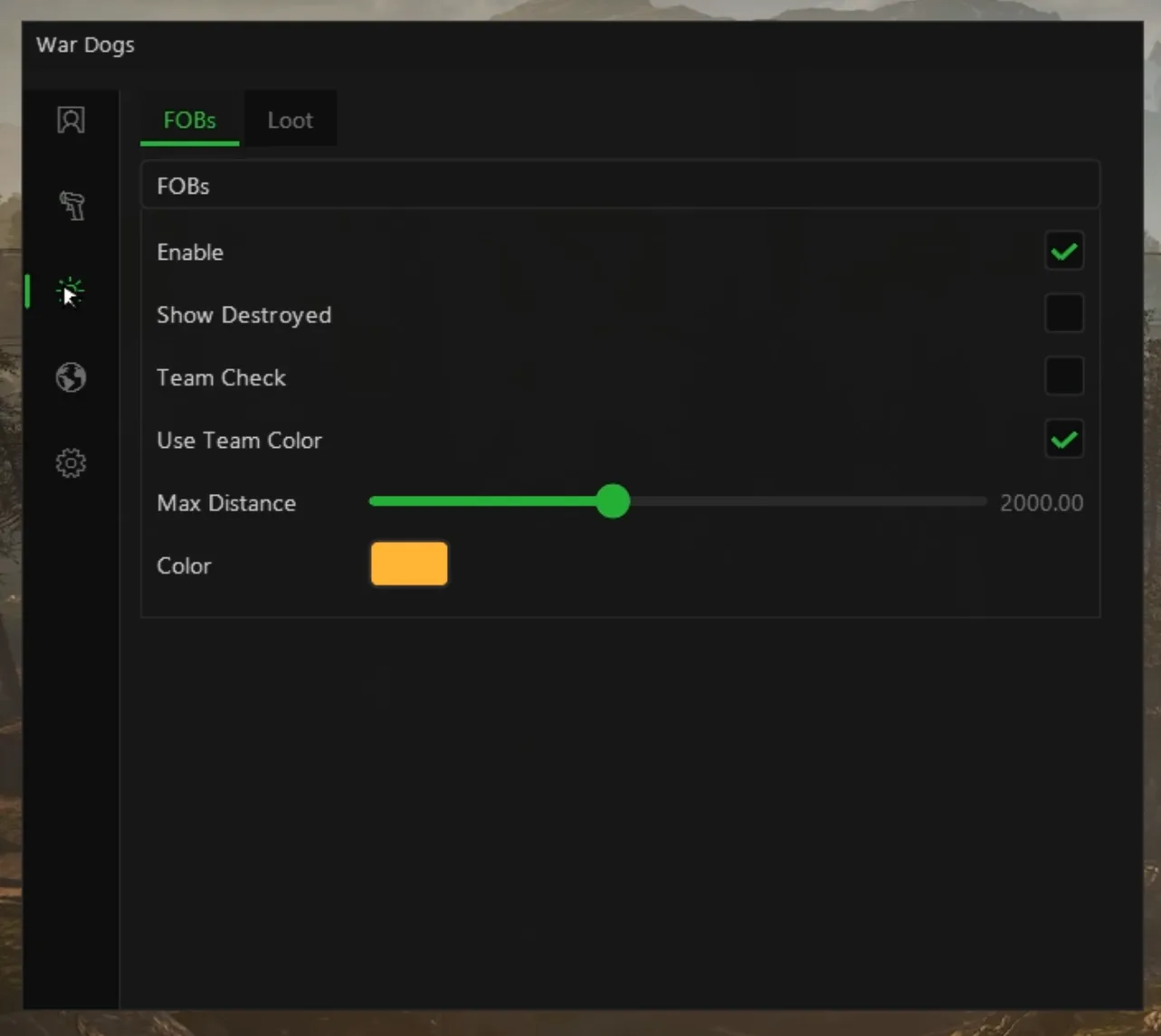
Marks every forward operating base through terrain, the supply and building hubs each faction digs in around the control zone.
FOB State: Active, Disabled, Destroyed (optional)
Shows whether each FOB is active, disabled or, if you want them, destroyed, so you know which bases still matter.
FOB Distance
The distance to each FOB in metres, so you judge at a glance whether it is worth a push or a mortar mission.
Team Check
Leaves your own faction out, so the aim never pulls onto a teammate and the player, vehicle and FOB ESP can show the two enemy sides only.
Use Team / Faction Colour
Draws each FOB in its owner's team colour, so you see at once which faction built where.
FOB Colour
A single colour of your own for every FOB, for when you would rather not use team colours.
Max Distance
How far out each ESP layer draws, players, vehicles, FOBs or backpacks, so a full 100 player server stays readable.
Backpack / Loot ESP
12 options
Enable
The master switch for its tab, the aimbot, player ESP, vehicle ESP or backpack ESP, so you run only the parts a given match needs.
Death Backpacks + Downed Corpses
Marks the backpacks soldiers drop when they die and the bodies of downed players, so the kit from the last push is easy to find.
Show Items
Lists the items inside each bag next to it, so you know what is in it before you walk over.
Compact View (source, best item, distance)
A short label per bag with where it came from, its best item and its distance, so a field full of bags does not fill the screen.
Reveal Key (full item list, cap 12)
Hold a key to see a bag's full contents, up to twelve items, before you commit to the walk.
Max Distance
How far out each ESP layer draws, players, vehicles, FOBs or backpacks, so a full 100 player server stays readable.
Text Colour
The colour of the vehicle labels and the backpack item text, so names and item lists stay readable against sky, dust or forest.
Loot Filter: Master Toggle
Turns the loot filter on or off in one switch, so you see every bag or only the ones worth a detour.
Loot Filter: Categories (Weapon / Ammo / Medical / Armour / Throwable / Other)
Shows or hides whole categories, weapons, ammo, medical, armour, throwables and other, so you look only for what your loadout is short of.
Loot Filter: Per-Item (Default / Wanted / Hidden)
Marks any single item as wanted to highlight it or hidden to ignore it, so the armour you need stands out from the rest.
Loot Filter: Search
Search the item list by name, so you set the filter for one rifle or one medical item without scrolling.
Loot Filter: Live Item List as Bags Are Walked
The item list fills as you walk past bags, so the filter always holds the items that are actually in this match.
Real captures
See the Wardogs cheat in action
Straight from the live build. No mock-ups, no stock art, no edited screenshots, just 10 real captures of exactly what you get.
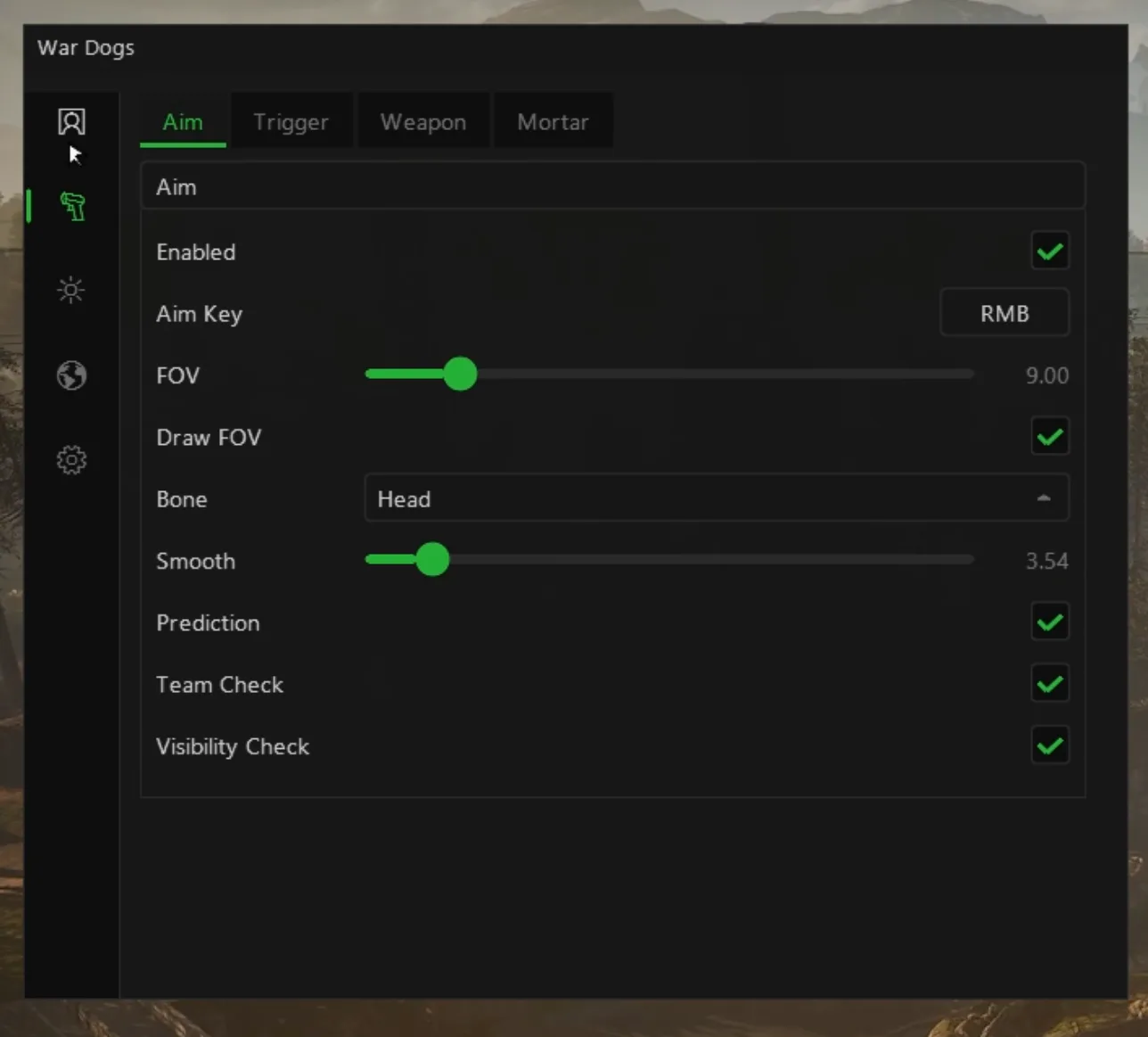
Aimbot
Aim key, FOV with a drawn circle, bone selector, smoothing, prediction, team check and visibility check.
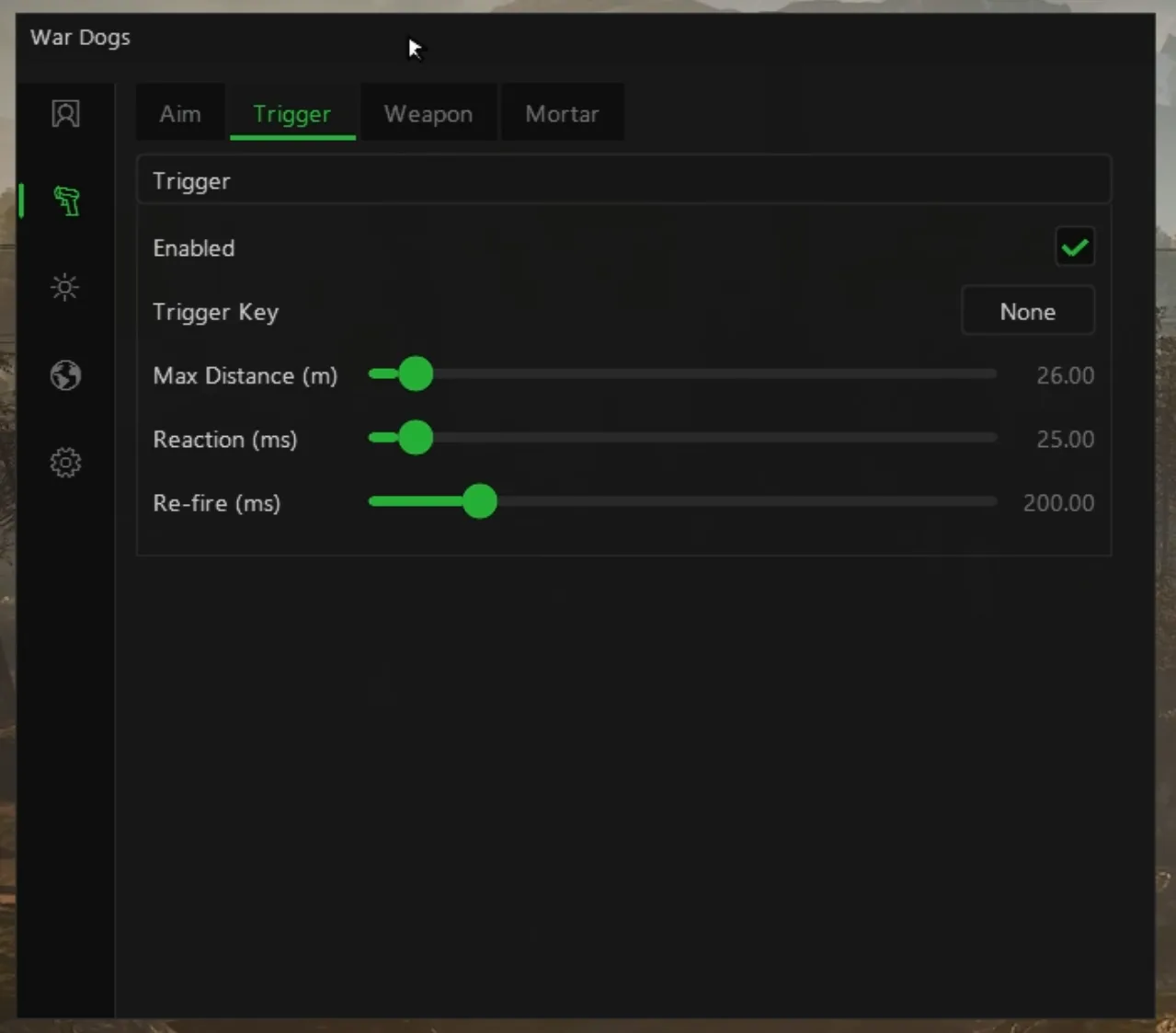
Triggerbot
Its own key, a max distance in metres, a reaction delay and a re-fire interval, all in milliseconds.
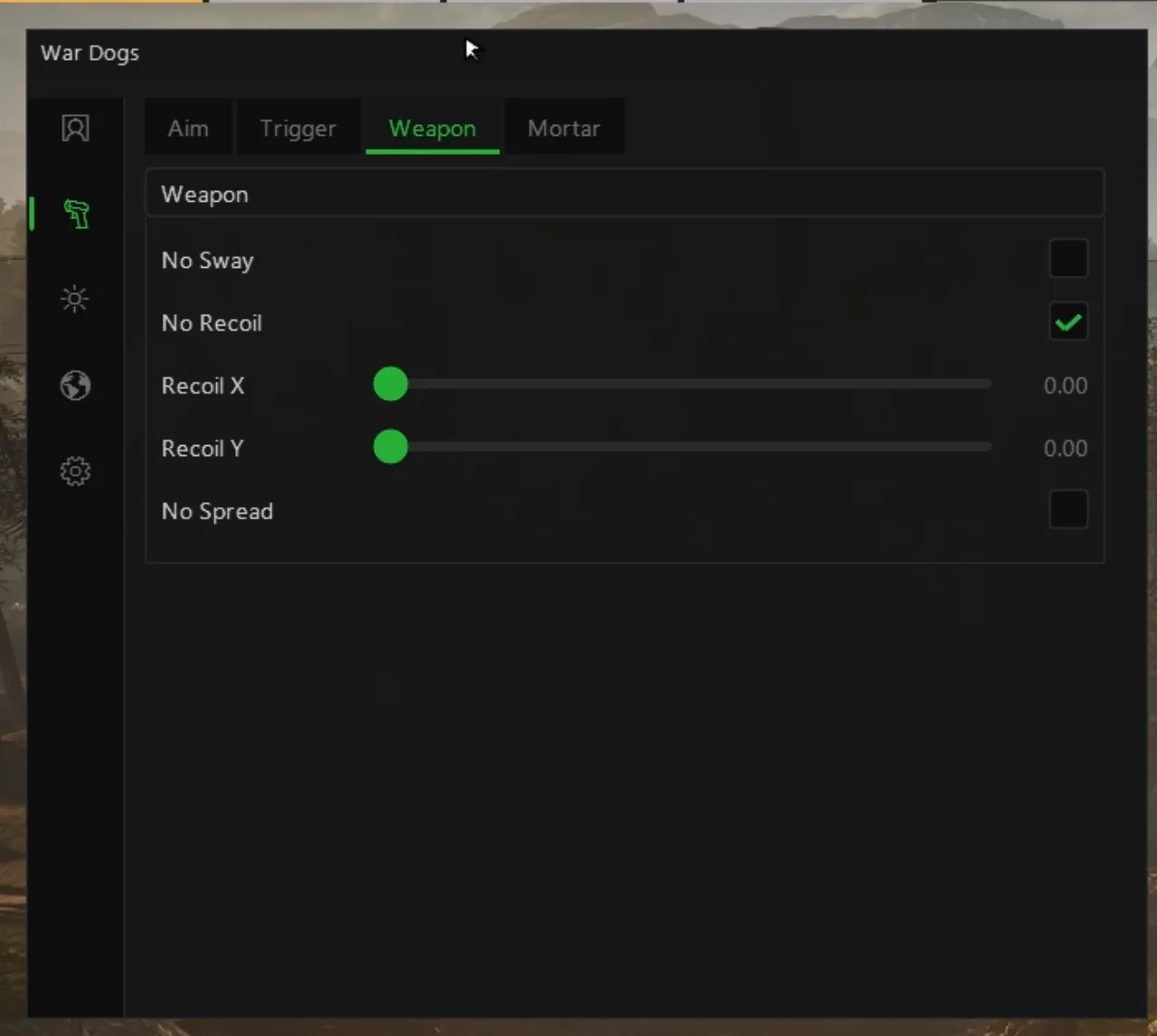
Weapon
No recoil with separate X and Y sliders, no sway and no spread, each a single switch.
Mortar
Mortar prediction on players, FOBs and vehicles, an impact marker, and next and previous target keys.
Player ESP
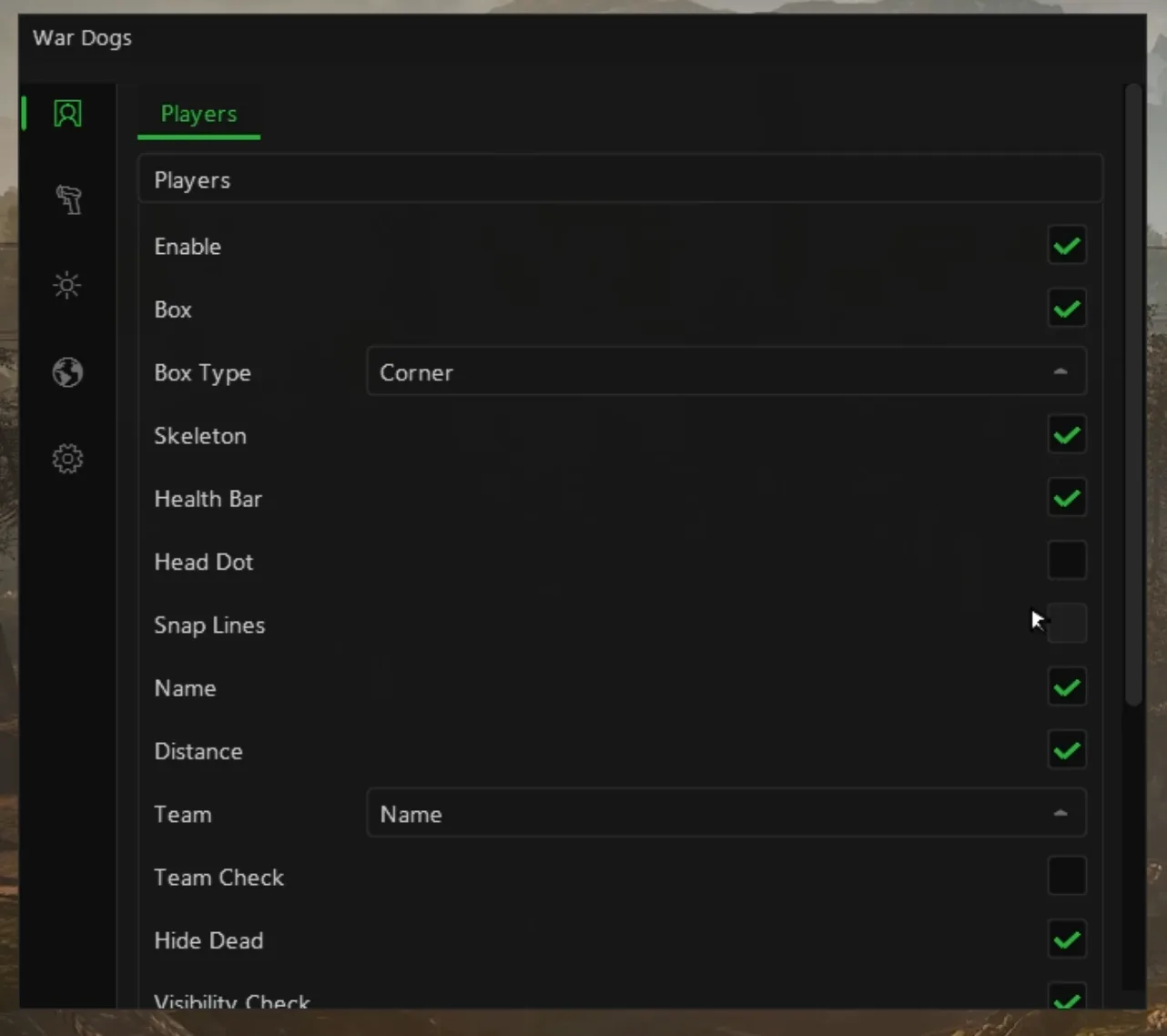
Corner or full boxes, skeleton, health bar, head dot, snap lines, names, distance and a team label.
Player detail
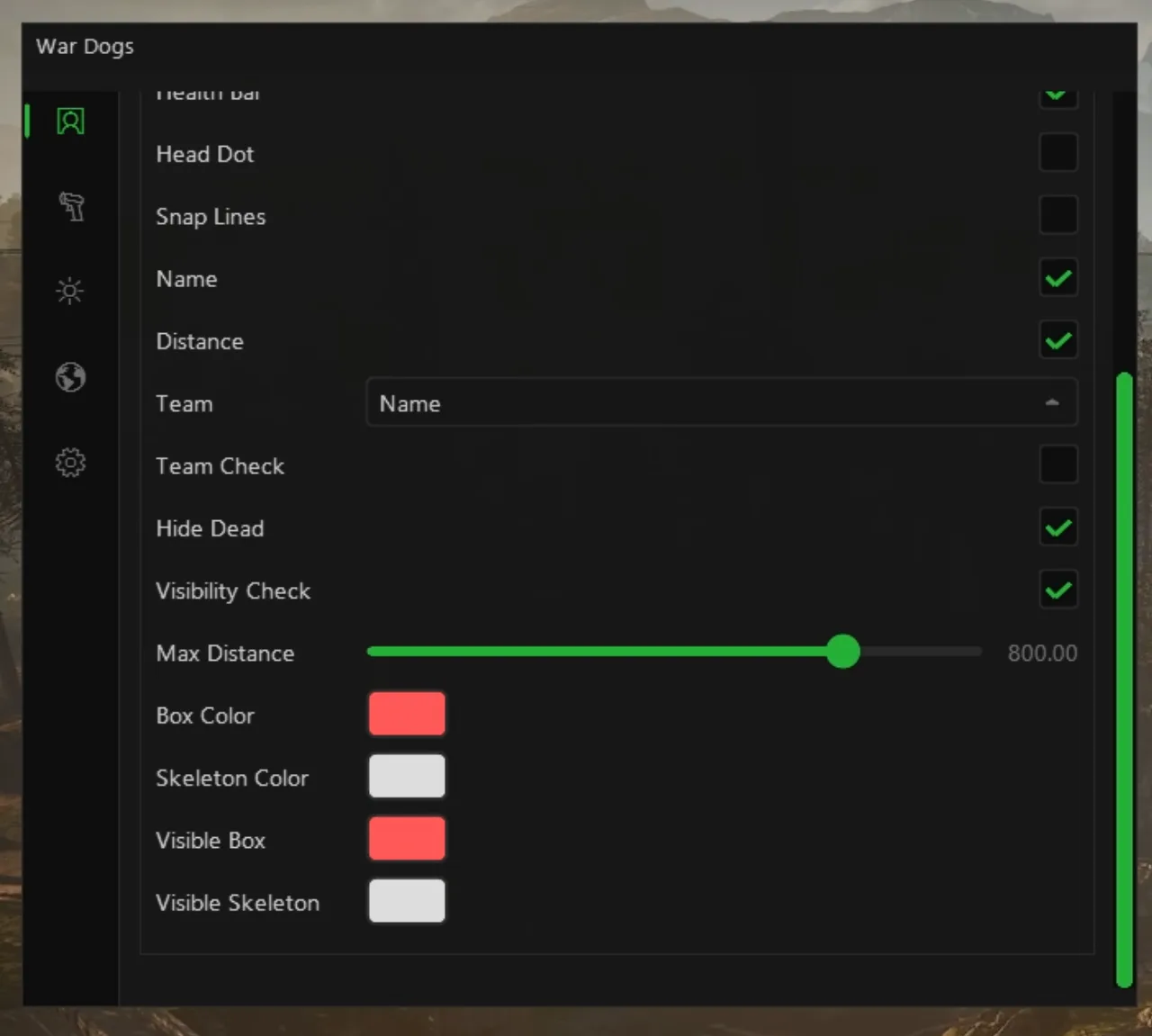
Team check, hide dead, visibility check, an 800 m range and separate colours for visible boxes and skeletons.
Vehicle ESP
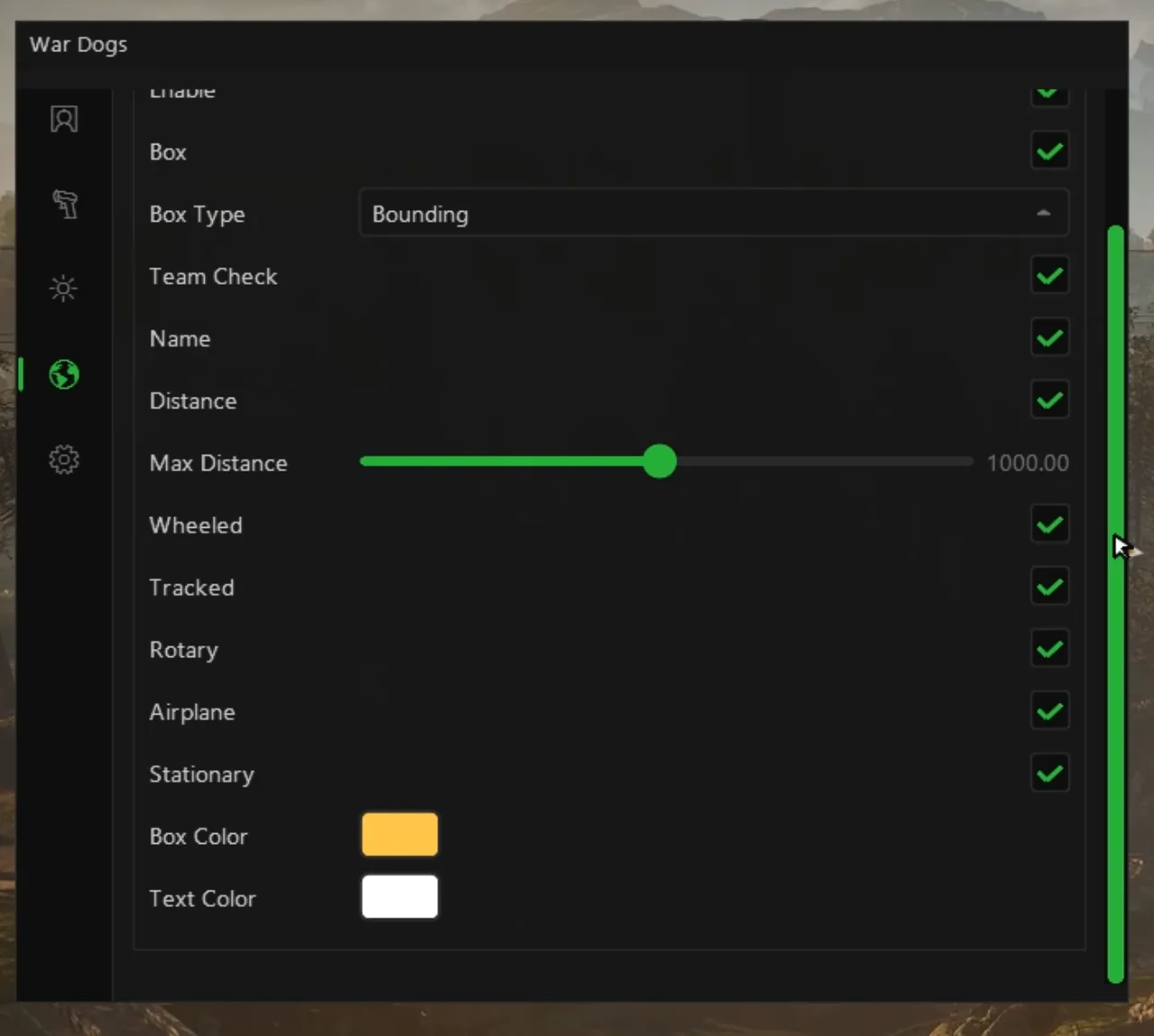
Wheeled, tracked, rotary, airplane and stationary vehicles with name, distance, team check and a 1000 m range.
FOB ESP
Every forward base out to 2000 m, in team colours, with team check and an option to show destroyed FOBs.
Loot ESP
Item ESP with a reveal key, a 300 m range and switches for weapons, ammo, medical, armour, throwables and more.
Settings
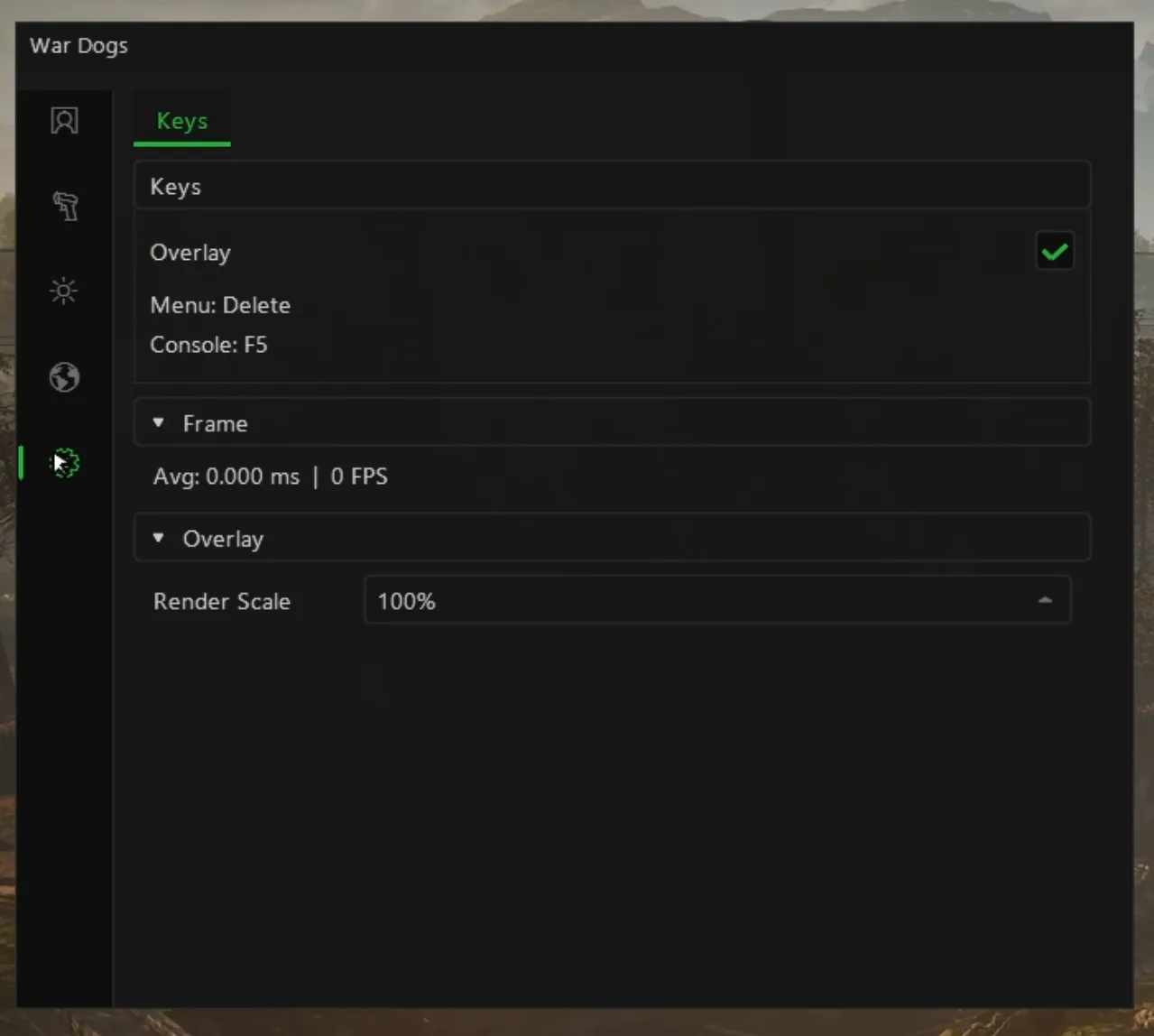
Overlay toggle, menu on Delete, console on F5, a frame-time readout and the overlay render scale.
1/ 10
1/ 10
Aimbot
Aim key, FOV with a drawn circle, bone selector, smoothing, prediction, team check and visibility check.
Triggerbot
Its own key, a max distance in metres, a reaction delay and a re-fire interval, all in milliseconds.
Weapon
No recoil with separate X and Y sliders, no sway and no spread, each a single switch.
Mortar
Mortar prediction on players, FOBs and vehicles, an impact marker, and next and previous target keys.
Player ESP
Corner or full boxes, skeleton, health bar, head dot, snap lines, names, distance and a team label.
Player detail
Team check, hide dead, visibility check, an 800 m range and separate colours for visible boxes and skeletons.
Vehicle ESP
Wheeled, tracked, rotary, airplane and stationary vehicles with name, distance, team check and a 1000 m range.
FOB ESP
Every forward base out to 2000 m, in team colours, with team check and an option to show destroyed FOBs.
Loot ESP
Item ESP with a reveal key, a 300 m range and switches for weapons, ammo, medical, armour, throwables and more.
Settings
Overlay toggle, menu on Delete, console on F5, a frame-time readout and the overlay render scale.
Full control
Every feature is a clean toggle, saved to your account.
Aimbot
Triggerbot
Weapon
Mortar
Player ESP
Player detail
Vehicle ESP
FOB ESP
Loot ESP
Settings
Included with every plan
Same undetected build, instant delivery and full support on every duration. No add-ons, no upsells.
Off sale for now · pricing shown for reference Billed once · cancel anytime · instant access
Plans from £9.99 · 1 Day to 3 Months
Truly undetected
Polymorphic builds, updated the moment the game patches.
Instant access
Pay and you are in. Access and Discord role in seconds.
Always updated
Builds update in the background the moment the game patches.
Barry, 24/7 AI
Setup help, answers and script writing, any time.
Wardogs cheats FAQ
What is included in the Wardogs cheat?
Every purchase gets the full Wardogs build with a humanised aimbot, mortar prediction and player, vehicle, FOB and loot ESP, all options in one menu you control in-game. Updates ship in the background the moment the game patches, and Barry plus the team are on hand 24/7 in Discord.
Are the Wardogs cheats undetected?
Yes. The Wardogs build is polymorphic and stays undetected on Elytra, rebuilt the moment the game or anti-cheat patches. No method is ever guaranteed, which is why we run live status in Discord around the clock and pause sales the second anything looks off.
Will I get banned using Wardogs cheats?
No method is risk free, but our whole job is to keep that risk as low as it goes. Builds are private, polymorphic and pulled the instant detection is suspected, and they are tuned specifically for Elytra. Play smart, use legit settings where it matters, and watch the live status before you load in.
What does mortar prediction do in Wardogs?
When you sit in an L81, a HUD shows the range and yaw you need to hit the target you selected, what the tube is set to now and the difference, with a HIT indicator once both line up. Targets can be players, FOBs or vehicles, cycled with next and previous keys, and an impact marker shows where the rounds will come down.
Can the ESP tell the three factions apart?
Yes. Team colour per element colours boxes, skeletons, head dots and snap lines by team, the faction name field labels each soldier, and separate enemy and teammate profiles let you draw your own side differently from the two you are fighting, whichever of Lonestar, Valkyra and Manticore they are.
Does the ESP show vehicles and helicopters?
Yes. Vehicle ESP covers wheeled, tracked, rotary, airplane and stationary classes, each with a box, its in-game HUD name and its distance, out to a range you set. A colour list fills as vehicles are seen, so you can give a helicopter or a tank its own colour.
What does FOB ESP show?
Every forward operating base in range, in its faction's colour or one of your own, with its distance and its state: active, disabled or, if you want them, destroyed. A FOB is where a team stores supplies and builds, mortars included, so knowing where the other two sides have built tells you where their defences and their L81s are.
How does the loot filter work?
Backpack ESP marks death backpacks and downed corpses. The filter sorts items into weapon, ammo, medical, armour, throwable and other, and lets you set any single item to default, wanted or hidden, with a search box and a live list that fills as you walk bags. A reveal key shows a bag's full contents, up to twelve items.
Is there no recoil for Wardogs?
Yes, on the weapon tab. No recoil removes the kick, the Recoil X and Recoil Y sliders set how much is removed on each axis from 0 to 100, and no sway and no spread are separate switches. Leaving some vertical recoil in is the simplest way to keep a spray looking like your own.
Is there a Wardogs triggerbot?
Yes, on its own tab next to the aimbot. It fires when an enemy soldier is under your crosshair, on a trigger key you choose, out to a max distance you set in metres. Reaction sets the pause before it fires and Re-fire sets the gap before the next shot, both in milliseconds, so it reacts like a player rather than in the same instant every time.
Can I tell bots and downed soldiers apart from live players?
Yes. Bots are labelled Bot in the name field and can have their own colour, and state colours separate downed soldiers and anyone in a vehicle from the rest. Hide dead clears bodies off the overlay, so after a big push the screen shows only the people still fighting.
Can I change what the ESP text shows?
Yes. Each text field, from name, role, squad and weapon in hands to ping, score and the DEAD and VEH flags, can be switched on or off, placed above or below the box, joined on one line or stacked, and sized. The layout editor shows the result on a live mannequin, and one button resets it.
Do I need a DMA card for Wardogs?
No. The Elocarry build runs on the same Windows PC as the game, with no DMA card, no second PC and no capture card. You need the Steam version of Wardogs, your Elocarry account and a few minutes for the loader.
Will the cheat keep working through Early Access updates?
The build is rebuilt the moment Wardogs or Elytra patches, and in Early Access the game changes often. Live status shows the state of the build around the clock. If a patch takes it down we pause sales until it is back rather than sell something that does not work, and lost time is covered by the compensation policy.
How many features are in the Wardogs cheat?
103 options across 9 groups: Aimbot, Triggerbot, Weapon, Mortar, Player ESP, ESP Text Fields, Vehicle ESP, World ESP and Backpack and Loot ESP. Every one is listed and explained on this page, and every plan includes all of them.
Is there a free Wardogs cheat or hack?
Free Wardogs cheats are the fastest way to get banned or hit with malware. They are public, so anti-cheat already knows them. Our paid build starts at £9.99, stays private and updated, and comes with support, which is why it actually keeps working.
How fast do I get access after paying?
Instantly. The moment your payment clears, your Wardogs access and Discord role are granted automatically. There is no waiting on a human.
Which platforms do the Wardogs cheats support?
The Wardogs build runs on a Windows PC and supports Steam. After purchase you follow a short setup guide in the launcher, and Barry or the team can help if you get stuck.
Do you offer refunds on Wardogs?
See our Refund Policy for the detail. If the Wardogs cheat does not work after our support team has stepped in, you may be eligible. Bans from anti-cheat systems are not refundable.
What Wardogs players say
Rated 4.7/5 from 259 reviews on Trustpilot. 86% five stars.
5 out of 5 stars
I was skeptical at first, but Elocarry completely changed the way I play Tarkov. The setup was insanely easy thanks to the cloud injection, and everything runs smooth and undetected. I've been here since the start as the rolled out more features and I was very impressed with customer support and how quickly they patch bugs. I don't like using aimbot... but, I'm a Fan of Silent aim. The Silent Aimbot is incredibly accurate without feeling clunky with a small fov, it gives you an advantage without making feel like it's too much, and the ESP super customizable and gives me full awareness without overwhelming my screen. What surprised me most was how secure it feels—every build being unique definitely gives peace of mind and I don't feel like I'm going to get banned every wipe. If you're serious about dominating raids and want a reliable, stream-proof advantage, 1100% recommend Elocarry. It's been a game-changer for me. rep+++
Ytree · Oct 2025
5 out of 5 stars
So far one of the better chairs, long term undetected and features like ammo counter, no recoil, sway and time flip which has been useful. Quest helper is brilliant at identifying where to go, item requirements where to find them and what to do. Aimbot could do with some improvement but there has always been continuous updates and new features. I'd recommend this to most players who are looking for EFT chairs and I've been using it for a few months and had not had a ban and low downtime due to updates.
Bastion · May 2026
5 out of 5 stars
After tes I've had a great experience with Elocarry. Their software has noticeably enhanced my gaming experience by providing smooth performance, useful features, and a user-friendly interface. Everything works reliably, and the setup process was straightforward. The team also seems committed to maintaining and improving their software, which gives me confidence in the product. If you're looking for tools that can help improve your overall gaming experience, Elocarry is…" *(truncated by "See more
Ben Northam Northy · Jun 2026
5 out of 5 stars
I've had a great experience with this service. I recently had an issue where my subscription auto-renewed by mistake, and I wanted to switch it to a different game. I reached out to the support team, and they handled it perfectly! Special thanks to Zlitz for the quick response and for being so helpful with my request. It's rare to find such a customer-oriented team that actually listens and finds a solution immediately. Fast, reliable, and very fair. 10/10 would recommend!
Amar Taher · Feb 2026
5 out of 5 stars
I tried a few other providers beforehand, and I have to say this will definitely become my new main EFT provider. Their support is awesome and fast. They updated their cheat in almost no time after the recent eft 1.5 patch, and their web interface is very clean and user friendly. The loader and injection process also feel really smooth and secure. Their guides are detailed, and the features are top notch. Definitely recommended! +rep
Sebi · May 2026
5 out of 5 stars
EFT chair is 9/10 imo, has some amazing features which majority of other providers lack. Smooth running, have used a hotspot to game the past few days while moving and the software has withstood that without any issues. 30mbps btw, elocarry staff has been extremely helpful and quick to answer any and all of my questions I would have to rate elo themselves a 10/10 chair provider, overall a happy future customer who is here to stay
damien powell · Oct 2025
5 out of 5 stars
EC has the game updated in a good amount of time and fixes issues with the cheese promptly. The devs are always available to help and explain what's happening. I have been a customer now for over 9 months and have had very little issues with their chair. It is very easy to use and my issues were fixed very fast. Customer service and devices always available to help. I love the fact that it is external.
James Burnett · May 2026
5 out of 5 stars
Honestly had a really smooth experience with Elocarry. Everything was handled quickly and professionally, and communication was clear the whole way through. They answered my questions fast and made the process feel easy and stress-free. You can tell they actually care about providing good service instead of just rushing people through. Definitely happy with the experience and would use them again.
Carl-Ardon · May 2026
5 out of 5 stars
Great products. Basically always Undetected sometimes there are ban waves but those hit every cheese provider the same. If you really care about your account and dont want to lose it dont cheese. I also got a full refund after there were some billing errors. I would always come back to elocarry especially since they arent as shady as other providers are
Marvin Bosten · Mar 2026
5 out of 5 stars
Elocarry provides a wide range of refined and updated services for each big games you play to give you that competitive edge from the ease use to the design of each product to give the customers a best experience when playing and using their software i dont know if i can name another provider that does what elocarry is doing right now.
xox · May 2026
5 out of 5 stars
I was skeptical at first, but Elocarry completely changed the way I play Tarkov. The setup was insanely easy thanks to the cloud injection, and everything runs smooth and undetected. I've been here since the start as the rolled out more features and I was very impressed with customer support and how quickly they patch bugs. I don't like using aimbot... but, I'm a Fan of Silent aim. The Silent Aimbot is incredibly accurate without feeling clunky with a small fov, it gives you an advantage without making feel like it's too much, and the ESP super customizable and gives me full awareness without overwhelming my screen. What surprised me most was how secure it feels—every build being unique definitely gives peace of mind and I don't feel like I'm going to get banned every wipe. If you're serious about dominating raids and want a reliable, stream-proof advantage, 1100% recommend Elocarry. It's been a game-changer for me. rep+++
Ytree · Oct 2025
5 out of 5 stars
So far one of the better chairs, long term undetected and features like ammo counter, no recoil, sway and time flip which has been useful. Quest helper is brilliant at identifying where to go, item requirements where to find them and what to do. Aimbot could do with some improvement but there has always been continuous updates and new features. I'd recommend this to most players who are looking for EFT chairs and I've been using it for a few months and had not had a ban and low downtime due to updates.
Bastion · May 2026
5 out of 5 stars
After tes I've had a great experience with Elocarry. Their software has noticeably enhanced my gaming experience by providing smooth performance, useful features, and a user-friendly interface. Everything works reliably, and the setup process was straightforward. The team also seems committed to maintaining and improving their software, which gives me confidence in the product. If you're looking for tools that can help improve your overall gaming experience, Elocarry is…" *(truncated by "See more
Ben Northam Northy · Jun 2026
5 out of 5 stars
I've had a great experience with this service. I recently had an issue where my subscription auto-renewed by mistake, and I wanted to switch it to a different game. I reached out to the support team, and they handled it perfectly! Special thanks to Zlitz for the quick response and for being so helpful with my request. It's rare to find such a customer-oriented team that actually listens and finds a solution immediately. Fast, reliable, and very fair. 10/10 would recommend!
Amar Taher · Feb 2026
5 out of 5 stars
I tried a few other providers beforehand, and I have to say this will definitely become my new main EFT provider. Their support is awesome and fast. They updated their cheat in almost no time after the recent eft 1.5 patch, and their web interface is very clean and user friendly. The loader and injection process also feel really smooth and secure. Their guides are detailed, and the features are top notch. Definitely recommended! +rep
Sebi · May 2026
5 out of 5 stars
EFT chair is 9/10 imo, has some amazing features which majority of other providers lack. Smooth running, have used a hotspot to game the past few days while moving and the software has withstood that without any issues. 30mbps btw, elocarry staff has been extremely helpful and quick to answer any and all of my questions I would have to rate elo themselves a 10/10 chair provider, overall a happy future customer who is here to stay
damien powell · Oct 2025
5 out of 5 stars
EC has the game updated in a good amount of time and fixes issues with the cheese promptly. The devs are always available to help and explain what's happening. I have been a customer now for over 9 months and have had very little issues with their chair. It is very easy to use and my issues were fixed very fast. Customer service and devices always available to help. I love the fact that it is external.
James Burnett · May 2026
5 out of 5 stars
Honestly had a really smooth experience with Elocarry. Everything was handled quickly and professionally, and communication was clear the whole way through. They answered my questions fast and made the process feel easy and stress-free. You can tell they actually care about providing good service instead of just rushing people through. Definitely happy with the experience and would use them again.
Carl-Ardon · May 2026
5 out of 5 stars
Great products. Basically always Undetected sometimes there are ban waves but those hit every cheese provider the same. If you really care about your account and dont want to lose it dont cheese. I also got a full refund after there were some billing errors. I would always come back to elocarry especially since they arent as shady as other providers are
Marvin Bosten · Mar 2026
5 out of 5 stars
Elocarry provides a wide range of refined and updated services for each big games you play to give you that competitive edge from the ease use to the design of each product to give the customers a best experience when playing and using their software i dont know if i can name another provider that does what elocarry is doing right now.