




 Undetected on EAC
 Rust ESP
Rust is a game about knowing things other people do not: which base has loot, which player is geared, where the ore is and what is inside a compound before you raid it. The ESP suite here is the largest in our catalogue, covering players, ore, loot, deployables, vehicles, animals and dropped items separately.
The Belt Panel is the option experienced players value most. It shows a player hotbar contents, so you can see whether the person across the field is carrying an AK and a medical kit or a rock and a torch, and decide whether the fight is worth it before either of you commits.
What the Rust ESP does
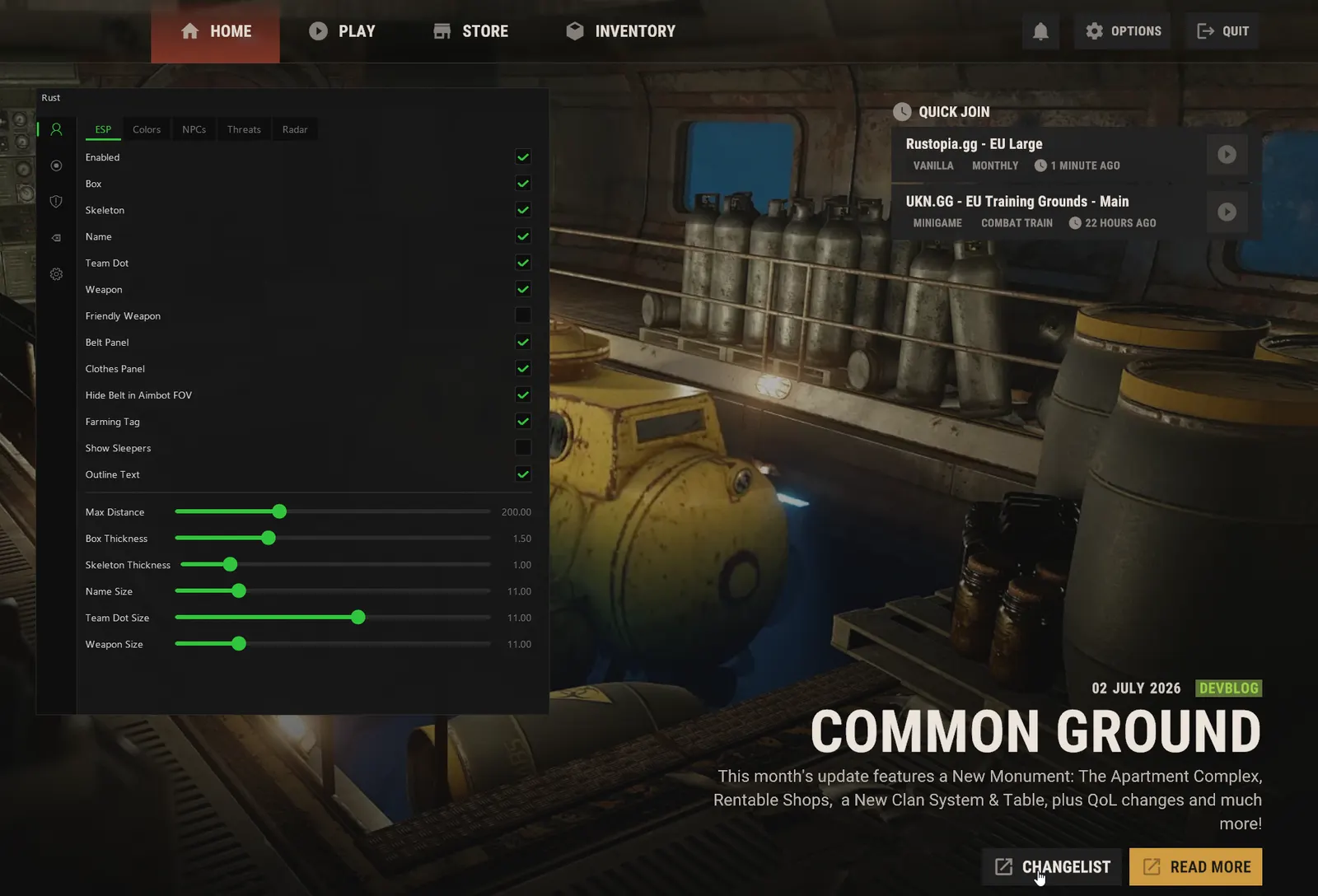
Every ESP category below is in the live Rust build, each with its own colours and distance.
- Box ESP
A box around every player through walls, rock and foliage, so a naked in the bushes or a camper on a nearby roof shows up long before they shoot.
- Skeleton ESP
Draws each player's skeleton through cover, so you read whether they are crouched behind a barricade, looking your way or sprinting off before you peek.
- Name
Prints a name over every player, and over every NPC in the NPC overlay, so you recognise the group that raided you last wipe the moment one of them walks past your base.
- Team ID
Marks which players share an in-game team, so you see at a glance that the three players on the road are one group and not three solos.
- Held Weapon
Shows what each player has in their hands right now, so you know if the player you are about to peek holds a bolt action, an AK or a rock.
- Friendly Weapon (Optional)
Shows held weapons on your own teammates too, kept optional so your screen stays clean, for checking who in the group is carrying the rocket launcher without asking in voice.
- Belt Panel (Hotbar Items)
Lists every item on a player's hotbar, so you know whether they carry meds, a second gun or explosives before you take the fight. The read experienced players value most.
- Clothes / Wear Panel
Shows what a player is wearing, so you tell a full metal kit from a hide set or a naked and only take the fights your own kit can win.
- Farming Tag
Flags players who are gathering rather than hunting, so the one swinging a pickaxe at a sulphur node reads as busy, not dangerous.
- Outline Text
Gives every ESP label a dark outline, so names and weapons stay readable against snow, sand and a bright sky.
- Max Distance
Caps how far out the overlay draws, set separately for players, NPCs and the threat arrows, so distant contacts on a busy server do not clutter your screen while you farm.
- Box / Skeleton Thickness
Sets the line weight of boxes and skeletons: thin to stay out of the way in a fight, thicker to pick a player out of the trees at range.
- Font Sizes (Name, Team, Weapon)
Sizes the name, team and weapon text separately, so the weapon line, the one you read fastest in a fight, can sit larger than the rest.
- Full Visible / Invisible / Friendly Colours
Separate colours for players in your line of sight, players behind cover and your own team, so a glance tells you who can shoot you now and who is still behind a wall.
- Box
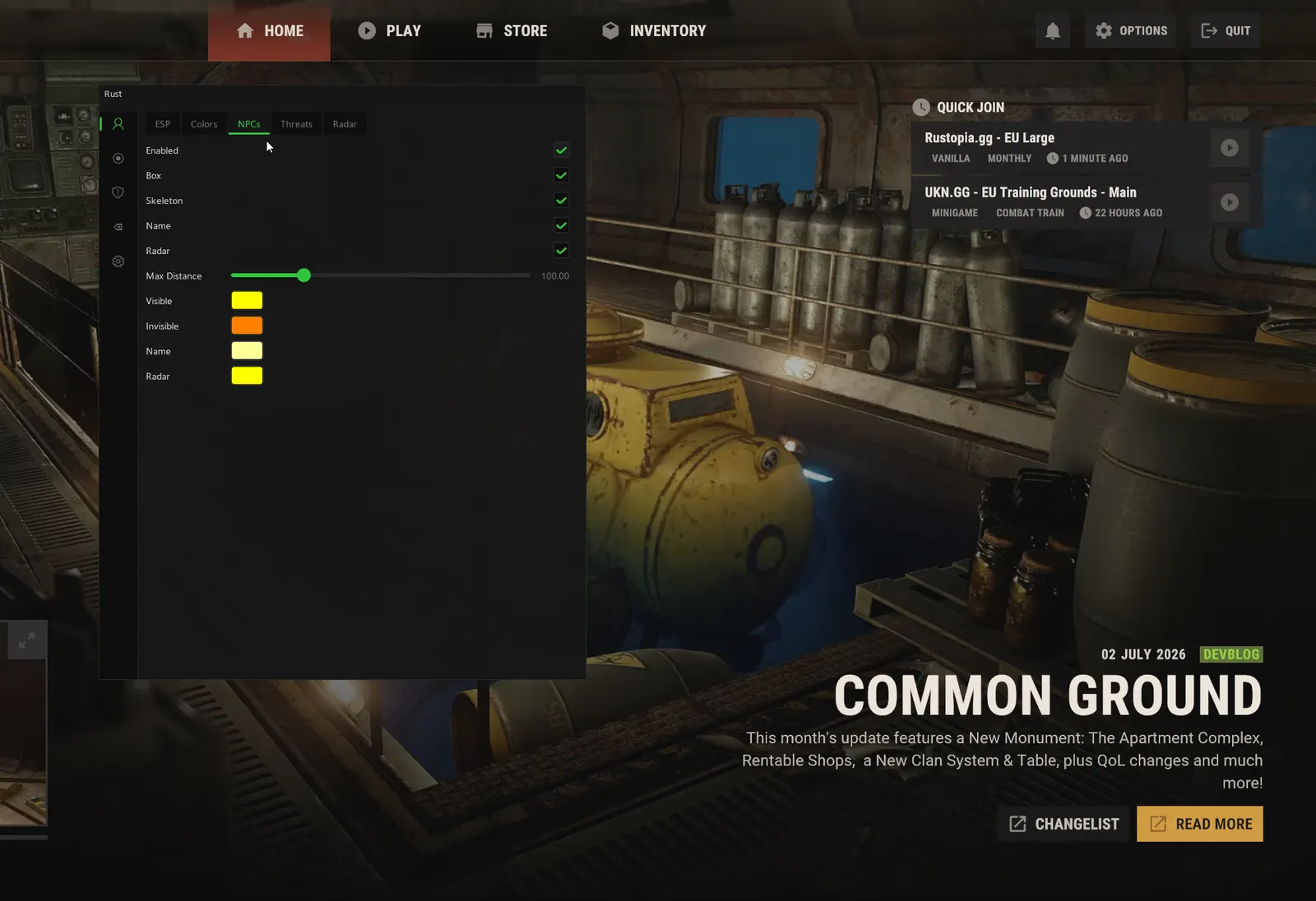
A box around every scientist and NPC through walls, so you clear a monument knowing where each one stands before you go in for the crates.
- Skeleton
Draws NPC skeletons through cover, so you see which way a scientist is facing and whether you can slip past or need to fight.
- Radar Dots + Distance
Puts NPCs on the radar with their distance, so a monument shows as occupied before you walk into a scientist's line of fire.
- Visible / Invisible / Radar Colours
Separate colours for scientists in sight, scientists behind cover and their radar dots, so PvE threats never read the same as players.
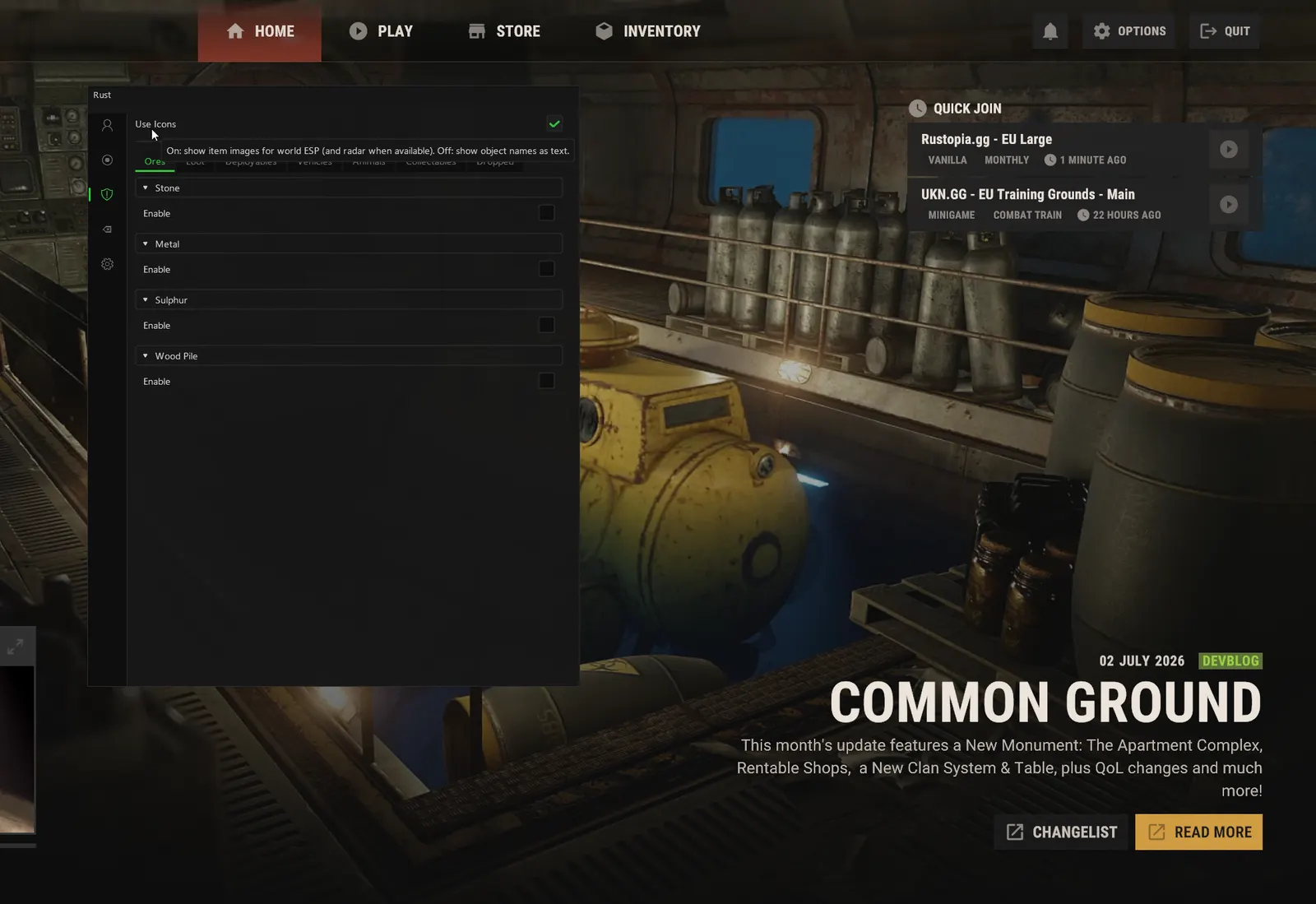
- Stone Nodes
Marks stone nodes, the material for your first walls and upgrades, so the opening hour of a wipe is spent hitting rocks rather than looking for them.
- Metal Nodes
Marks metal ore nodes, the source of the metal fragments and high quality metal behind tools, guns, armoured doors and a stronger base.
- Sulphur Nodes
Marks sulphur nodes, the ore behind gunpowder, ammo and every explosive, so a raid's worth of sulphur is farmed in a planned loop.
- Wood Piles
Marks wood piles, so the wood for a starter base and furnace fuel is a short walk rather than a search through the forest.
- Per-Type Name, Distance & Radar
Gives each node type its own name label, distance and radar dot, so sulphur can show on the radar while stone stays on screen only.
- Per-Type Colours + Max Distance
Sets a colour and a draw distance for each node type, so sulphur reads from far away while stone only appears when you are close.
- Stone / Metal / Sulphur Collectables
Marks the small ore pickups lying on the ground, free resources you grab by hand with no tool, ideal for the first minutes after you spawn.
- Wood
Marks wood pickups on the ground, enough for a first tool or a campfire straight after you wake up on the beach.
- Hemp
Marks hemp plants, the cloth for sleeping bags, early clothing and bandages, and the starting point for a farm.
- Pumpkin / Corn / Potato
Marks wild pumpkins, corn and potatoes, food on the move and seeds for a planter, so hunger never forces you home mid-run.
- All Berry Types
Marks every colour of berry bush, a snack on a long walk and the ingredients players farm for teas.
- Diesel
Marks diesel pickups, the fuel that runs the mining quarries and the Giant Excavator, so you collect it before another group does.
- Metal Detector Sources
Marks the spots a metal detector picks up, so you dig where the loot is instead of sweeping a field waiting for a signal.
- Elite / Military / Normal Crates
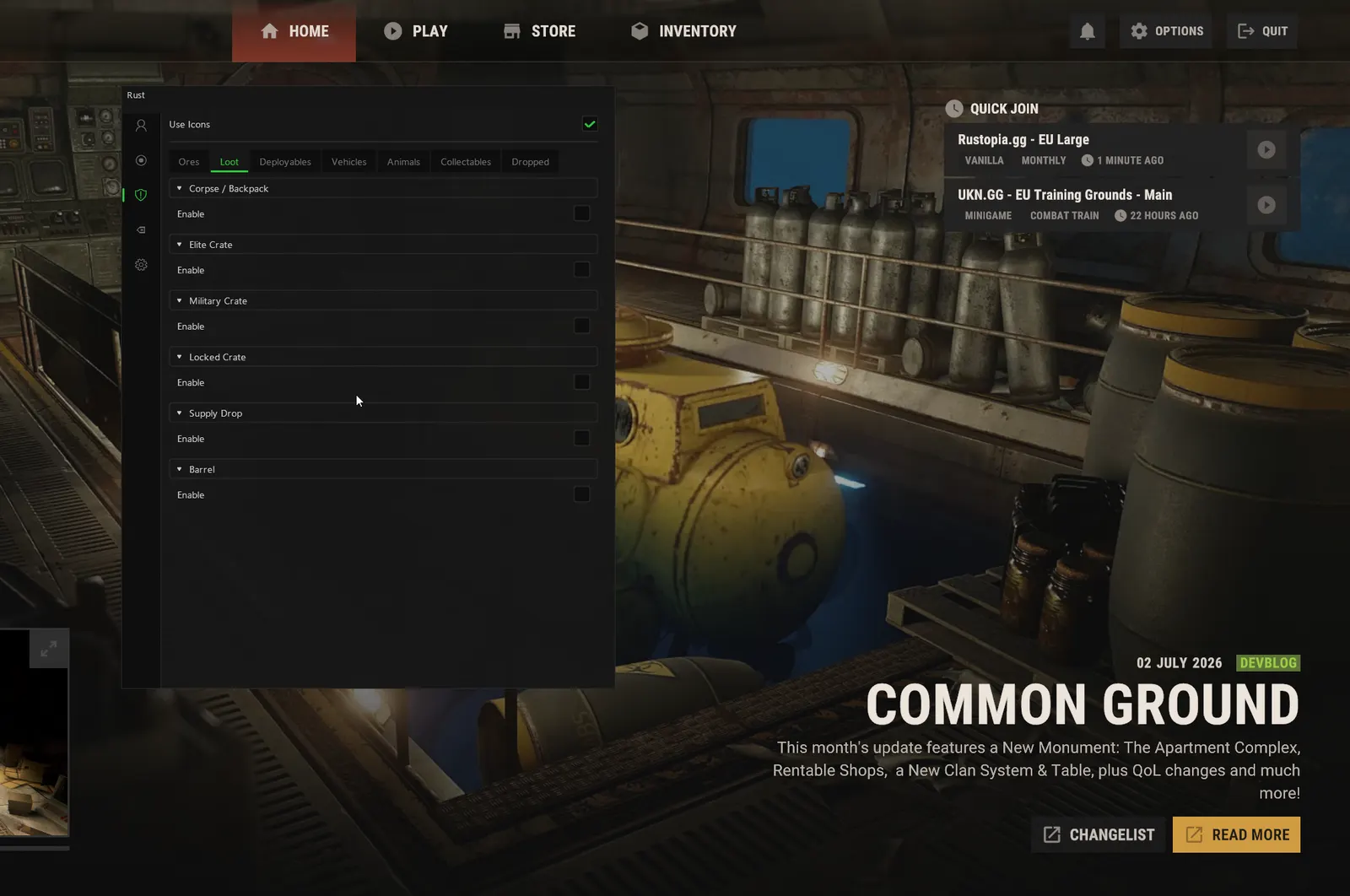
Marks every crate by tier, so a monument run goes straight to the elite and military crates where the guns and components are.
- Locked Crates (Timer Text)
Shows locked crates with their hack timer as text, so you know when the crate at a monument or on oil rig opens and when to be in position.
- Supply Drops
Marks supply drops where they land, so you reach the drop before the players who are still following the smoke.
- Medical / Food / Ammo / Fuel / Tech Crates
Marks the specialist crates by type, so you head for the ammo crate when you are low and the tech crate when you need components.
- Toolboxes
Marks toolboxes around roads and monuments, a quick stop for tools and components on any loot run.
- Underwater Crates
Marks crates on the sea floor, loot most players never collect because it cannot be seen from the surface.
- Bradley / Heli Crates
Marks the crates the Bradley and the patrol heli leave when destroyed, so you are on them when the fire goes out and can see who else is heading in.
- Barrels / Fuel Barrels
Marks road barrels and fuel barrels: scrap and components from one, low grade from the other, the runs that pay for your first workbench.
- Corpses / Backpacks
Marks player corpses and dropped backpacks, so the loot from a fight you won, or one you heard nearby, is not left lying in the grass.
- Stashes
Marks small stashes buried in the ground, the hidden loot solo players rely on, which are almost impossible to spot unless you walk right over one.
- Auto Turrets
Marks auto turrets through walls, so you know where a base is defended before you walk into range or plan where to break in.
- SAM Sites
Marks SAM sites, so you fly a minicopter around a base that can shoot you down rather than straight over it.
- Tool Cupboards
Marks tool cupboards, the heart of every base and the target of every raid, so you see where the TC sits behind the walls.
- Planters
Marks planter boxes, the sign of a farm base with cloth, food and seeds stored somewhere nearby.
- Large Boxes / Storage
Marks large wood boxes and other storage, so you see which rooms of a base actually hold the loot.
- Furnaces / Large Furnaces
Marks furnaces and large furnaces, which show where a group smelts its ore and often where its loot room sits.
- Workbenches T1–T3
Marks workbenches by tier, a quick read of how far a group has progressed this wipe and what weapons to expect from it.
- Shotgun / Bear / Landmine / Flame Traps
Marks shotgun traps, bear traps, landmines and flame turrets, so you never walk into a trap base or a rigged airlock.
- Oil Refineries
Marks oil refineries, where a group turns crude oil into the low grade fuel that runs its furnaces and lights.
- Recyclers
Marks recyclers, so you plan scrap runs around the nearest one and see who is waiting next to it.
- Batteries / Generators
Marks batteries and generators, the power behind a base's turrets and lights, so you know where the electricity runs before a raid.
- Sleeping Bags / Beds
Marks sleeping bags and beds, the respawn points that tell you where a group can come back from mid-raid.
- Patrol Heli
Tracks the patrol helicopter wherever it flies, so you are not caught in the open by its rockets and can choose when to take it on.
- Bradley
Shows the Bradley APC on its patrol at Launch Site, so you approach from an angle its cannon cannot cover.
- Minicopter / Attack Mini / Scrap Heli
Marks every player helicopter type, parked or in the air, so you see a group arriving by air or find a heli sitting unattended.
- Cars / Trains
Marks cars and trains, so you see who is driving the roads and what is moving on the rail line.
- Tugboat / Rowboat / RHIB
Marks boats from rowboats and RHIBs to tugboats, which groups turn into floating bases, so the sea is never the quiet route it looks.
- Subs (Solo + Duo)
Marks one and two seat submarines, which are close to invisible under the surface without it.
- Snowmobile
Marks snowmobiles in the snow biome, so you spot a rider crossing the ice long before you hear the engine.
- Motorbike / Sidecar / Pedal Bike
Marks bikes from pedal bikes to motorbikes with a sidecar, the quick ground transport groups use on the roads.
- Cargo Ship
Tracks the cargo ship as it sails in, so you board while the crates are still there and know whether another group got on first.
- Bear / Polar Bear
Marks bears and polar bears, the animals that kill fresh spawns, and a big haul of meat, fat and leather when you win.
- Wolf / Boar / Stag
Marks wolves, boars and stags, so you hunt for leather and fat early in a wipe or avoid a wolf pack on a long walk.
- Horse / Chicken
Marks horses and chickens, a mount for crossing the map and easy early food.
- Shark
Marks sharks in the water, so diving for underwater crates or swimming between islands never ends in a surprise bite.
- Tiger / Panther / Snake
Marks the jungle predators, so a tiger, panther or snake waiting in the undergrowth is seen before it reaches you.
- Guns
Marks guns lying on the ground, dropped in a fight or left by a player who died, so you never walk past a free weapon.
- Armour
Marks dropped armour, so a dead player's facemask or chest plate is picked up before someone else finds it.
- Medical
Marks dropped syringes, med kits and bandages, the items that decide who survives the next fight.
- Resources
Marks dropped resources such as sulphur, metal and cloth, often what a farmer was carrying when they were killed.
- Food
Marks dropped food, so hunger is fixed from the ground instead of a trip back to base.
- Explosives
Marks dropped explosives such as C4, rockets and satchels, worth more than almost anything else you can pick up off the ground.
- Ammo
Marks dropped ammunition, so the gun you just picked up off the ground can actually fire.
- Components
Marks dropped components such as gears, springs and pipes, the parts every weapon and tool needs to craft or recycle into scrap.
- Tools
Marks dropped tools, from a pickaxe or hatchet to a hammer, so a fresh spawn can start farming straight away.
- Other
Marks anything dropped that does not fit the other categories, so nothing worth taking is missed in the grass.
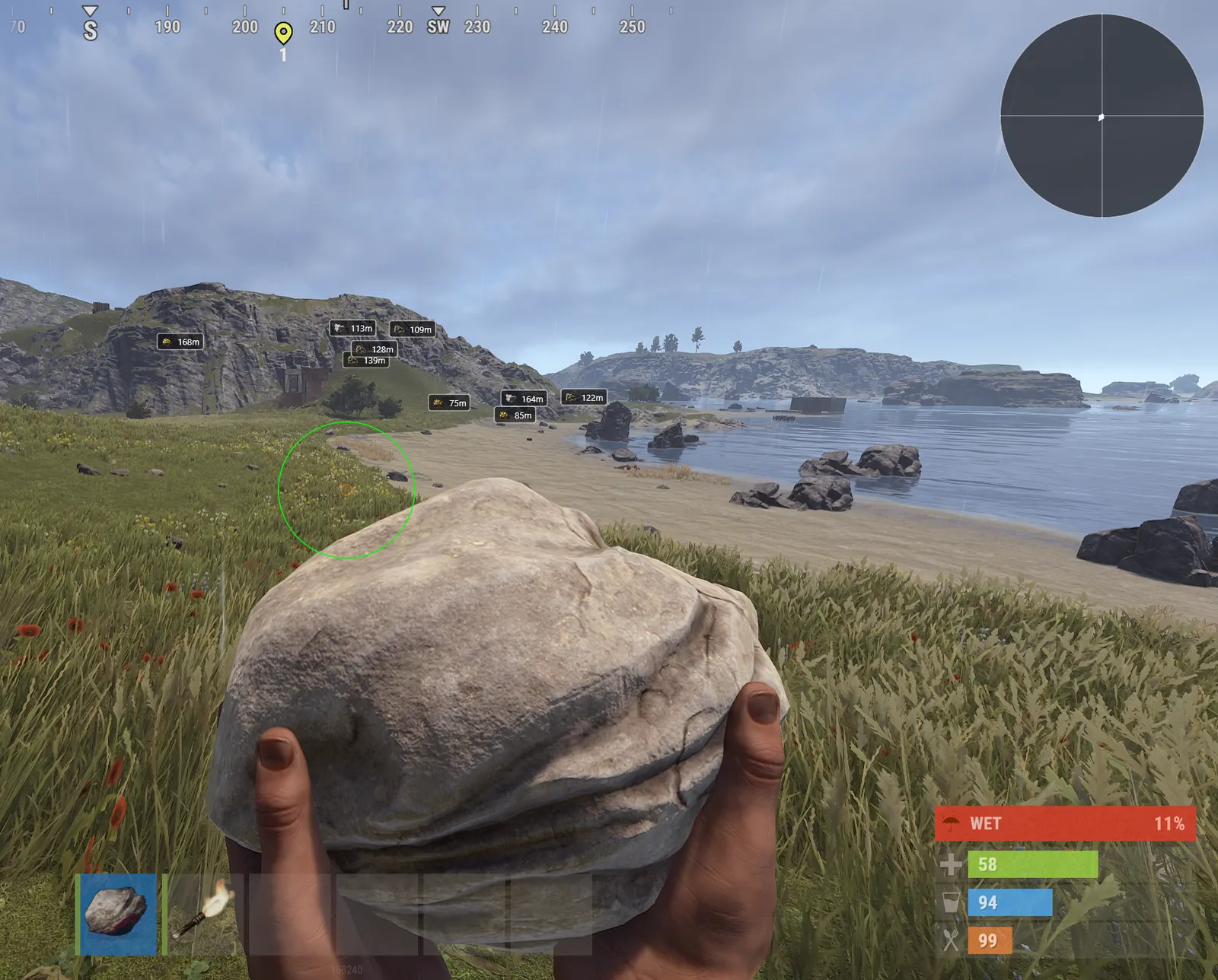
The Rust ESP in action
Real captures from live Rust servers.
How the Rust ESP works
What the overlay resolves as you move across a wiped map.
Reads their inventory
The Belt Panel shows hotbar contents and the Clothes and Wear Panel shows worn gear, so you know exactly what a player is carrying and how geared they are before you take the fight.
Finds what is worth taking
Separate overlays for Loot, Deployable, Ore, Collectable and Dropped Item ESP mean you can see stashes, tool cupboards, crates and nodes without walking a monument or a compound to check.
Warns from off-screen
Off-Screen Threat Arrows point to players outside your view with their own max distance and colours, which is how you avoid being shot from an angle you were not watching while farming.
Why the Rust ESP wins fights
Everything in Rust is earned over hours and lost in seconds. Seeing a Farming Tag on a player tells you they are gathering rather than hunting, seeing an empty tool cupboard tells you a base is abandoned, and both let you spend your time on the things that actually pay.
The Culling Mask is the standout for raiding. Held on a key, it hides construction layers so you can see inside a base before you spend the explosives, which turns raid scouting from a guess about where the loot room sits into something you simply look at.
Rust ESP FAQ
Can I see what a player is carrying in Rust?
Yes. The Belt Panel shows their hotbar contents and the Clothes and Wear Panel shows worn gear, so you know whether you are facing a naked with a rock or a geared player with an AK and medical supplies before you commit to the fight.
Does it help with raid scouting?
The Culling Mask is built for exactly that. Held on a key, it hides construction, deployed and debris layers so you can see the internal layout of a base and where the loot room sits before you spend a single explosive on the wrong wall.
Does it show ore and resource nodes?
Yes, in detail. Stone, metal and sulphur nodes, wood piles, hemp, berries, diesel and metal detector sources all have their own toggles, colours and max distances, so a farming run stops being a search.
Is there a map radar as well?
Yes, a full map overlay with auto seed and size detection, plus a circular dish version. It shows player, NPC and entity dots with distance and a facing triangle for your own position, and it works alongside the on-screen overlay rather than replacing it.
Is the ESP a separate purchase?
No. It is part of the full Rust cheat. One licence unlocks the ESP and every other feature in the build.
How do I get the Rust ESP?
Pick a duration on the Rust page and pay. Access and your Discord role are granted instantly, then you load the build and toggle the ESP in the menu.
What Rust players say
Rated 4.7/5 from 259 reviews on Trustpilot. 86% five stars.
- 5 out of 5 stars
Honestly one of the most hard working group of people i've ever interacted with, ive known EC since 2024 and i have to say from then till now it's been a up hill ride from staff to product, always top notch.
Lost · May 2026 - 5 out of 5 stars
After a minor setup hurdle (thanks to the quick support for the help) I'm absolutely thrilled. The program works reliably in the background and meets all my expectations. I would definitely buy it again!
Horst Thomasser · May 2026 - 5 out of 5 stars
Has been one of the easiest cheats to use and purchase, everything went smoothly and the checklist the put up before you ever start up cheat is quite impressive as most just throw you into the deep end.
joe biden · May 2026 - 5 out of 5 stars
Really good service, they literally make a checklist to do not get any errors thats incredible professionalism, and they do it with streampro too, amazing product and really fast with updates +REP
CEBOLA GG · May 2026 - 5 out of 5 stars
Placed an order and got the product instantly after payment. There a nice detailed walkthrough that showed all the steps needed for launching the software. The performance is really good. 10/10
Vooren · May 2026 - 5 out of 5 stars
One of the easiest loader ,you are in the game in seconds zero performance issue feels like feather for your system. support most of the windows version and also active support.
Berkay · May 2026 - 4 out of 5 stars


"Elocarry has been the 2nd provider I have chosen on the market and I honestly don't have any needs to change to another one - I am staying there as long as Elocarry exists.
Cash Plays · May 2026 - 5 out of 5 stars
one of the safest bf6 cheats out there, most of the other providers are getting hit hard with bans, ive used elocarry for well over a month now and i have no issues no bans
Rekar · Oct 2025 - 5 out of 5 stars
It definitely works. I bought a 24hr ow key. Used it for like 8 hours today(unhealthy ik) and I've ranked up from silver 4 to plat 4 without ban or single accusation LOL
NocturnalWyvern · May 2026 - 5 out of 5 stars
excellent support with almost instant reply and resolve of the situation. found the product useful and safe if you are smart. deff recommend ELO
Anthony David · Jan 2026
Latest Rust guides
Tips, tactics and patch notes from the blog, straight from the team.
How To Build A Base In Rust
Building a base in Rust is the foundation of your survival. Whether you're playing your first wipe or returning after a break, learning to build efficiently…
Read article Guide 27 Oct 2025The Best Rust Servers in 2026, Ranked by Playstyle
The best Rust servers in 2026: top rated vanilla, 2x, 10x, solo/duo/trio, PvE and PvP servers with region and wipe schedule, checked in October 2026.
Read article Guide 20 Oct 2025A Guide To Rust For Solo Players
Rust is one of the toughest survival games ever created, a brutal test of skill, patience, and determination. Every second in Rust is a battle against the…
Read article
